Pages

Showing posts with label Desktop Publishing. Show all posts

11.11.10

Bristol.... The Edam Is Stranded: Comic Strips, You Tube, Print Screen and Publisher

This term during ICT enrichment sessions, a colleague and I have begun to develop a sequence of activities working towards the creation of comic strips.

Comic Strips are complex text forms that I have explored a number of times through posts in my blog, but they are also great fun.  In introducing comic strips, how they are constructed and the features of the text type, we wanted to provide space for the students simpy to play and explore. This resulted in our initial session using an online comic strip generator.  Our choice for this was Make Beliefs Comix a site providing 3 frame strips, drag and drop characters and tools, and point and click editing. This allowed the students space to simply play and create in the style and genre while becoming familiar with some of the features we might expect to see supporting text development in a comic strip eg captions, speech and thought bubbles etc.  A key skill we also expect is the student's capability to take screen shots of their work, to support our APP process, so completed strips were copied,  using the prtscr before being pasted to a local application (MS Publisher) for cropping and resizing, the latter part of this process being a useful one for the students to use later as they create their own comic strips.

As teachers in our school have access to You Tube, I decided to develop the sessions around creating new stories and narratives from familiar starting points.  To introduce the sessions we began watching a couple of movie shorts from the Aardman YouTube Channel, and the Cracking Contraptions series.  I chose the Snoozatron and Shopper 13, for my sessions partly because I love the sixties seventies space race puns in the latter, but also because Gromit's facial expressions throughout the snoozatron, just beg for and invite the use of visual cues to infer possible content for thought bubbles.

You Tube uses flash movies, which gives another advantage, in that they can be used. unlike many other online video formats, for direct screen capture from the web browser.  Prior to the session I previewed each movie and at significant or interesting points in the story, used the print screen key to capture these scenes.   Paused the movie, centreing the movie viewer in the window, I pressed the print screen key to capture scenes.  Using Microsoft Paint, the resulting images were then pasted individually into software, cropped and then saved to a folder as JPEG images.  In school the images collected from each movie were copied into the shared storage space for access during sessions by students.

Having watched the movies, I shared a prepared model for a publisher based comic strip with the students, (an available design) and modelled how to
  • Open Microsoft Publisher
  • Change the page orientation
  • Insert images from file and where the prepared files could be found
  • Change file view so they could browse image thumbnails to aid their image selection
Before encouraging the students to begin creating their own visual version of the story of their choice, the first steps in developing their creative recount.

Publisher being an object based package, is a really intersting way to allow students the facilty to draft and redraft visual story structures on the go.  Once images have been added the students can then begin manipulating their story, dragging and reorgnising images to develop and resequence their visual narrative.

During this process a number of fundamental DTP and graphic handling concepts become increasingly important to developing a quality outcome from the draft, and identified themselves as incidental teaching points.
  • Layering and ordering.  When using object based packages latter images added will tend to overlap and cover pieces of earlier images when moved and placed.  By using the order tool, images can be moved forward and backward on the page to overcome this.  
  • In Publisher clicking the view menu and then tools allows opening of a "context menu/tool bar" that appears when an image is clicked, that allows insitu editing of images from this "picture bar."  This tool bar allows images to cropped, colour effects to be applied, brightness and contrast adjustments to made and transparency effects to be applied to areas of an image.
  • Clicking on the image also reveals resize handles enabling drag and drop resizing of the images and use of the rotation tools on the tool bar also enable free rotation of images, or the possibility to change image orientation by flipping them,  giving yet more visual dimensions to image handling.
 With the images in place our next steps over the coming weeks will be
  1.  Further play with these tools enabling consolidation through talk of the narrative structure to be developed by the students.  
  2. Development of the use of callouts, stars and captioning to add oral text elements to the story.
  3. Use of peer assesment and review to identify HTIs before editing, revision and publication.
Image Attribution:  Images are either Screen captures from YouTube video versions of the Aardman Shorts
The Soccamatic
The Snoozatron

Shopper 13
or composite images created using MS Publisher by the author from images captured from these.
Wallace and Gromit are Nick Park Creations

10.11.07

The Craft ROBO Plotter Cutter: Integrating sensing, modelling and control in DT

On Firday last I spent a really enjoyable morning working with a colleague at our local secondary school exploring the Craft ROBO plotter cutter and its associated CAD package. I was really pleased with the Christmas card I finally made, but as a user of the Nuffield DATA Primary DT materials, available freely on line, this tool is now a potentially powerful addition not only to our DT toolbox, but also in support of the modelling and sensing strands of our ICT curriculum. Thanks to Phil for inviting us to take part in the DT project he is developing between a local cluster of Primary schools and his department with the support of the Medlock Charitable Trust. I left yesterday, at lunchtime with yet another toy to play with and share, a community sharable object based CAD package and one of these lovely tools.

As a personal professional support tool, I have uploaded these videos to return to later, but thought some of my regular readers might also be interested in taking a look at the tool and its potential uses for themselves.

Video 1: An overview of the Craft ROBO


Video 2: A demonstration of the tool


In terms of modeling, one of the things I liked about the tool is the potential to prototype. Designing on paper first how an object might look before beginning to develop the project in real time. Students can sketch design proposals to paper, and then transfer these designs to the screen, by applying shapes to a work surface in the craft ROBO software package. Being object based these features can be dragged around and placed using layout grids. Turning on snap to grid, means the objects can be dropped and held in place accurately on screen. Using colour coding, the plotter cutter can be instructed which areas to cut, which areas to leave and with the insertion of a biro, the tool is converted to plotter rather than cutter mode. Prototypes and mockups, can be plotted first, and then replacing the biro with a cutting bit, a prototype can be cut using paper first. Inserting dotted lines lead to perforation cuts, being made, that allows for easier folding by small hands, no need for scoring.

After prototyping the full design, can be developed, with photographs or images inserted to the design file. Printing out on a colour printer, leads to the production of a colour net and the addition of "registration marks." which are later used by the cutter to align itself in relation to the design, when instructed to cut. This has alsorts of potential for developing these sessions to discuss sensing and control, within the context of the DT application for which the tool is being used. I am looking forward to trying out this tool with students as christmas approaches, and have already got one or two ideas for how we might use this to develop standard as well as animated christmas cards.

8.9.07

IKEA Man Meets the Primary Framework

Engaging formally with the New Primary Framework for Literacy and Numeracy this week, has proven a steep learning curve. Getting my head round what the documentation means has been challenging in places, I knew what I wanted to achieve in my planning from past experience, but finding and defining/refining the learning objectives to meet these within particular sessions within the new documentation sometimes proved problematic, since they had been moved, often appeared woolly and required unpicking, to find, identify and define specific aspects for particular sessions. In our planning process this week we have worked with the new framework alongside existing documentation to help this. Working in this way has proven really beneficial, using the new framework to define the progression while identifying aspects to support this from within the older more specific objective structure.

Being an IKEA man I see my classroom practice as linked to a planning process that involves designing for learning. The more open and flexible, structure of the new framework, provides a space to enable reflection and consideration of what I feel the students need to learn in order to achieve outcomes that draw on the wider curriculum as a source for support. I have my longer unit structure, enabling definition of outcome and identification of a more progressive approach to tool use and skill development through the Literacy curriculum as a cross curricular dimension. By taking a more global perspective I am able to use curricular forecasts to frame and consider the timescales necessary to embed the skills development process. This in turn enables me to identify and place development of these skills more readily within wider classroom activities I intend or am able to develop, allowing a window on progression towards the development of "quality" outcomes by students in relation to these by the end of a unit or beyond. This has also enabled me to bring to bare the wider view of what text and textuality mean to me within the context of the units I am planning within the themes we are working on.

Perhaps looking at the framework slightly differently will help me work with colleagues as subject leader for ICT, to progress the embedding process for ICTs as tools, if we see the documentation as a transformative device. A bridging tool between now and where we want to be.

In planning progression for our Poetry unit and beginning to organise the development of our classroom ICT areas for example, literacy tasks have been framed within a progression for ICT. In class we will be using desktop activities to develop vocabulary, engage with word play, presentation of words through for example calligrams, rebuses, shape poems, collecting and organising word lists, and shaping and reforming these in different ways. We have discussed using digital photography to capture other methods of representation, gesture and body shapes, presenting images to support "talking for writing" and collaborative engagement to develop group and paired poetry. The outcome for the unit of work overall is to create a class anthology. This alongside the development of handwriting for presentation, is the ICT focus for our outcome. Learning and revisiting in our ICT areas and online classroom initially how to format texts, using drag and drop, changing font style, colour, size, shape to bring new emphasis to textual elements that will engage our readers. Finding and importing images to support our meaning making. The aims of these activities to engage students in discussing use of words and exploring how we represent their meanings, while drawing on "available designs" from table top tasks to support this as the students engage with reconstructing the text.

The ICT skills tasks will have a focus on comprehension and meaning making, while introducing other poetic forms such as acrostics and list or shape poems. These will be used to consolidate the ICT skills base we need to develop, while preparing and extending classroom based experiences and tasks within use of the online classroom. As well as handwritten outcomes students will be using classroom based platforms to input drafts to screen based on desktop tasks, to be re-presented and edited later. Using the IWB the students will engage in modeling and familiarisation throughout the unit of text editing and formatting processes. As we work to complete the poetry unit in class, the works, developed through big writes, guided sessions and table top tasks, will enable extension of the literacy unit and word play, as they form tools and frames to be changed and re-presented using skills developed in focussed practical tasks towards the design outcome for the ICT unit. Our ICT unit outcome is to produce a desk top published class anthology.

I find thinking aloud really helpful, and thinking this through today has been really beneficial in beginning to clarify the links that I want to make. Thank you for listening.

26.5.07

Bill and Ben's Outstanding Adventures

Thinking about back stories for the Airbus DT Project some of my students have been working with me on I began wondering how we might present this. As you might guess from recent posts Comic Strips have featured prominantly in the work of our year 6 students, creating caricatures and telling stories.

The props for our DT challenge, have been centred around two Play People, who for some reason or another must use the vehicle we design to escape safely from something. I visited the Playmobil Website for inspiration this morning, and in the Online Shop found some scenes, from which two characters particularly cried out, "caption us! Liberate us from this cage of two dimensional meaninglessness!" Never one to refuse anyone in such obvious distress I downloaded the Hazmat Team to my PC and Using Microsoft Publisher did my best to help the fearless pair express themselves, and share their current predicament.


Playmobil is a resource which many of us have in school, and perhaps don't readily recognise as an ICT resource. However listening to students as they engage in or describe their activity following role play activities, or while reviewing game play using computer games, their is a striking degree of narrative development which takes place and which we could draw on to promote and support writing activity, both on paper and onscreen. I do feel however that we need to broaden our view of what writing is in order to achieve this.


Using ready made images like the one above to prompt the creation of comic strips is one way, of making the link, but we could extend this to enable the students to develop the scenes for themselves. Using Playmobil, as an example, how about using table top and found materials to create dioramas and scenes in which to place our characters, rehearsing stories orally, and using Digi Blues to capture significant scenes, which the children might later add sound tracks, page turning effects, animation or written text to, by importing the images to applications such as 2 create a story, MS Photostory or Powerpoint. They might also import the images to Word Processing Packages or Desk Top Publishers and add speech bubbles and Captions creating their own comics for class or web publication.


Why stick with static images when you could make movies.


New for 2007! "Bill and Ben's Outstanding Adventure." Coming to an interactive whiteboard near you!


Building on paper based storyboarding activity, or emerging from role play, maybe set in the dioramas the students have made, stop motion animated movies could be made using digi blues. As actors in the film, The Playmobil characters star in the adventures that develop, and springing from their 2 dimensional cage of meaninglessness, or comic strips onto the big screen. Sound effects, voiceovers, music and visual effects could then be added, drawing on the planning framework provided by a comic strip, or a script provided by the speech bubbles and added during editing in perhaps MS Movie Maker.


I have been asked by my year 6 colleagues this term to work with them to help them and the students who are moving on, to create an alternative leaving service for their parents. It would be great to draw on the multimedia and multimodal experiences the students have had this year and brought to school from the world outside to develop something special and more than the previously powerpoint laden event. Pondering this morning perhaps we could use Playmobil characters or other toys and props to help them represent the adventure they are about embark on including some stop motion animation, pixelation and digital video work, to support this, alongside the other means of representation they are familiar with.

11.4.07

Big Kid! New Toys!

Have spent quite a bit of time playing with Comic Life over the holiday and had a blast, but also discovered at the same time a new role for MS Publisher, an old favourite of mine. I have used this with children from Year 3 to Year 6, for everything from drag and drop sequencing tasks to building web pages and combining graphics and text to develop picture books, advertisements and poetry, see previous post"We've been doin' bold today", but never considered using it until this week for making comic strips.

Many of the how to handouts I have made to support staff in the past, have probably ended up as supports for wobbly desks, rather than guides to software and how they might be used. These have often been overly wordy with the inclusion of screenshots to help. I hope though that My new Wilbur Helps Out guides might be a bit different. Wilbur as a character emerged a couple of years ago to act as a guide for a web design initiative I had to develop within my Masters Course. Over the holidays though Wilbur the Book Worm, has aquired a new role, as a guide to new software, appearing in his very own comic strip for student and staff how tos. I have been impressed by the way this format strips away the often longwinded explanations, and how a carefully selected image or series of images, combined with captions and speech bubbles can clarify the most seemingly complex of tasks. I will be trying these out with colleagues and students first, before uploading them to my webspace and our school website for sharing.

During the week I also made a surprising discovery... This is probably really familiar to everyone else, so I'm going to look really silly.... Do I care! Not a jot, as it came as a complete surprise to me and was really exciting too... I was familiar with being able to drag images from Windows Explorer into open documents and files, but while playing with the Mac on the web last weekend discovered how you could drag images off a web page in the Safari Browser, directly onto the desktop. What I didn't realise however is that you can now also do this with Internet Explorer on the PC. Never again will I spend hours saving images to file from right click. I can now simply open or create a new folder and drag the image from the page directly to it. Since then I have also discovered that images can be dragged from the web page directly into open documents in some applications, or image editors. So in making for example smart notebooks, opening the notebook software, tiling it onscreen alongside Internet Explorer, the image can be dragged from the web page straight into the notebook. This process also works with text, by highltighting the text you want in the browser, then dragging and dropping it directly onto the page, as a text object.

19.12.06

We've Been Doin' Bold Today!

This comment came from a cheery chap on his way back from an ICT skills session one morning. I was sure he must have been doing more than this but he was insistant, that bold was what he had been doing.

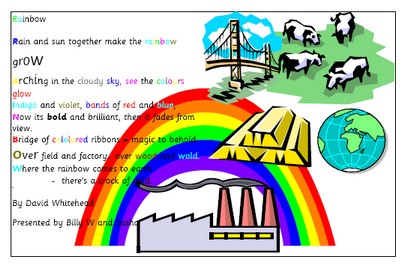
Word processing and desktop publishing, units can be integrated in really interesting and exciting ways within Literacy Sessions to encourage engagement with texts at a whole text and word level. A unit I have just carried out with a group of year 3 children really fired them up, and helped them explore poems in more depth. We all began with the same acrostic, Rainbow by David Whitehead. I typed out the poem using MS Word, and then copied the file as a template to each student's folder.

We began the session by sharing and exploring the poem on the Interactive Whiteboard. I began by embolding and changing the colour of the initial letters of each line, to match those of a rainbow. The students quickly spotted how each line began with a letter in the word rainbow, and that rainbow was spelt out down the left of the poem. We discussed how by highlighting letters and words we could alter their appearance, shape colour and size using the formatting tools on the tool bar, and at their workstations the children were asked to recolour the word rainbow wherever it appeared throughout the text. As the session unfolded we began to extend this, and to consider how we might change the font style, colour, shape or size to help the words on the page reflect their meanings, and how we might make verbs look like their actions, eg arching, growing or fading. The children really enjoyed experimenting and playing with the text in this way.

During the following sessions, the wordprocessed text was revisited, and ideas children had used were shared. This is one of the joys of a network and access to an IWB, all ongoing work is accessible for sharing and evaluation by a wider audience. The completed texts were copied and pasted to Microsoft Publisher, where it became part of a designed poetry book page. The students searched the clipart gallery and inserted images to reflect the content of the poem. These were dragged around and placed to suit their ideas. Sometimes as page backgrounds, and sometimes as illustrations. Working with the poem in this way really challenged their comprehension skills, as well as engaging them in learning those ICT skills necesary to complete their project, and which I had set out to teach and consolidate. We have published our acrostics as a class book, and despite beginning with the same file each poem is far from identical. The different text styles, graphic elements and spacial qualities of each page make all individual, and in themselves are discussion points about how visual resources can be used to create and change the meanings we present.

The children went on to play a limerick game, applying the skills they had acquired in these tasks to design and make their own poetry pages. The poetry books we made, the text file we began and reference for the source of our Limerick game are presented within the Year 3 Community pages of our School Website.