Last term I began working with colleagues and students in phase three, as a member of the Integrated Curriculum Team. The young people in phase three are vertically grouped 11-13 years old (y6 to 8) students, and Integrated Curriculum Sessions involve them in engaging with cross curricular themed activities, developed around the focussed teaching of Personal Learning and Thinking Skills.
During term 1 we worked primarily on a project based on The Man of Iron, Isambard Kingdom Brunel and his legacy in the Bristol Area. The Key focus areas were rooted in developing key skills for Independent Learning and Research as well as facilitating situations to promote Team Work and collaboration. Throughout the term, students explored a number of aspects of Brunel, his life and his legacy, using material from Primary and Secondary sources. The following are a pair of video outcomes created using Internet based collect and store processes, and our first attempts at using MovieMaker to prepare and share the outcomes of our work digitally.
In class a number of table top activities were used to prepare and plan the presentations, before using ICTs.
Inference squares were used to facilitate and support image based reading activities, and ground the raising of questions as starting points for research.
Mindmapping was used to record and help link and group key ideas collected from a range of text sources, including books, internet based texts, images and the reading of videos.
Timelines were used to chronologically order and sequence the major events in Brunel's life.
Desk Top Timelines then formed the planning frame that supported image searches and helped sequence the basic story we wanted to tell using Movie Maker
Images collected from the web were imported to MovieMaker and sequenced/ chronologically or grouped according to the preferred method of presentation.
The original intention was to have students record a voice over, so our paper based timelines were developed to become "storyboards" with simple scripts to support this.
As the video creation process evolved we began to think about how we could create video presentations in a "victorian style." Silent movies/Newsreel arose as a possible idea, and in MovieMaker the credit tools were used to add captioned splash screens between clips. To give the clips that "olde worlde" feel an aged film effect was applied to many of the individual clips, and music added as a soundtrack. The students had a great time, and these are just two from our collection. Hope they provide a little inspiration :o)
Video Attribution: Thanks to George, Maisie, Oliver and Katie
We have been preparing material for our celebration assembly for parents. This has included compiling from our collection of photographs; a series of video montages. The tool of chioice for this has been Microsoft Photostory a flexible and easy to use tool, that I have used many times with students to compile for web display, graphic work carried out in class based ICT sessions.
Today a suggestion was made by the students that we use some of the images form our story telling sessions about Grace Darling to form a backdrop to part of the show. I instead asked a group of students to help me script a voice over, and had a student volunteer to record it in Podcast Voice with a partner. The following is their outcome.
The students who finally recorded and presented the story, did a cracking job as you can see and hear, but today, as with their other written forms, were encouraged to save some of their errors and bloopers. Clips from the cutting room floor are often used in shows such as "It'll be alright on the night" and "bloopers" are also often selected from movies in the making for inclusion on DVDs. They humorously show how even the most professional of us can sometimes get things wrong.
Today was a real treat when the students shared not only their "finished" product, but also their "blooper Clips." It seems that our narrator had a particular problem with one of the worms... words, eventually giving up on it to use another she felt was less of a tongue twister. It takes an amazing amount of self confidence to share these kind of mistakes, and is a sign of the maturity and self assurance that this group is developing through the use of Multimodal tools such as this. They are definitely moving beyond the self concious and developing a greater audience awareness. The safety they felt as "broadcasters" today was also evident in their willingness to share discuss and laugh along with their friends at the difficulties they had encountered and demonstrating how they had revised and edited, rerecorded tracks to produce the outcome they were seeking. A huge well done, thanks and tumultuous applause to both R and T for a job well done.
" Thanks to Steve from Wiltshire LA, for this "Nugget." A collection of interactivities, teacher's notes, web and IWB resources, based around historical images. A swift play myself, and I found some great starting points for talk and guided investigational work; using images as both primary and secondary sources. Our History theme this term is on the Victorians, and there is a host of material to support this. Using images as secondary sources, there are also materials on the Tudors, castles, the Romans and other common themes, and subthemes. A site to come back to and definitely one to share with colleagues.
As a class this term we have been reading the Amanda Mitchison Biography "Who was... ? Isambard Kingdom Brunel." The story even though a challenge in places has fascinated the students. The book has proven to be a fantastic stimulus for discussion about the "great man of Iron" but when combined with web based images and tools has also stimulated high quality talk for writing in support of mechanism based explanatory texts .
Of Worms and Men..
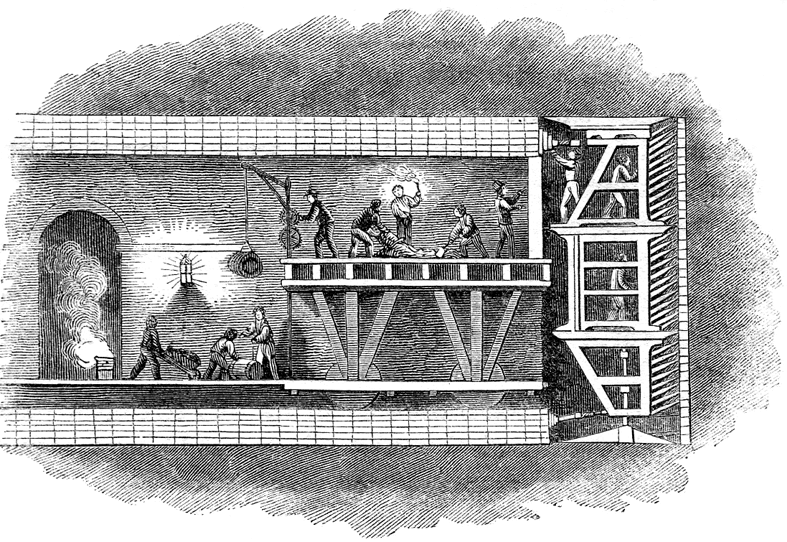
The tunnelling shield invented by Brunel's father, appeared in the opening chapter of the biography and was a great starting point for discussion, one which began with Marc Brunel's observing ship worms at Chatham Docks, before inspiring his idea to dig tunnels through a process of removing spoil, inching men forward in a protective shell and lining with bricks the space behind them as they work. This principle is still employed in modern tunneling, and the enormous tunnel boring machines we see today work on a similar basis. The use of modern control technologies, machine automation of processes, global positioning and monitoring and sensing technologies may have improved navigational accuracy, speeded up the process, but it is no less dangerous today than in the past, spoil still must be removed and the machinery maintained, driven and programs planned, miners still scurry around in the spaces between the tool and the tunnel, lining it as the machine edges forward. The system has advanced, but even as the technology charges on, the principles of its evolution and in many ways its operation remain similar to those originated in Brunel's time. A need is identified, available designs and tools explored affordances exploited to identify possible solutions, before adaptations or innovations are made on these to create a product that either meets our needs, or carries us forward into the unknown. As we have read Brunel's story together I have tried to be mindful of this in the discussions we have had, not only talking about the great man's life and works, but also exploring the similarities between old and new technologies. Not only is this a valuable place to be in terms of historical investigation, comparing past and present, but an essential process based conversation to have in light of a DT curriculum in the England that requires students to engage as designers and makers through Investigation Dissassembly and Evaluation Processes, and an ICT curriculum that requires a similar set of processes to evolve beyond the skills based aspects of the curriculum in developing ideas and exploring the impact of ICT on everyday life.
In terms of Literacy development the formal use of terms relating to "cause and effect" are not common place in the talk that we use or encounter. The written genre of explanation requires us to write from an impersonal perspective and to use "Causal Connectives" such as "this causes, " "as a result," and so on. Taking an impersonal view of the action we are describing can be a real challenge, I remember myself writing science experiments up for the first time at secondary school and being reminded constantly that I needed to use impersonal pronouns while I tried to explain the process as if I wasn't involved. In essence this made the difference between my report being an explanatory text and a set of instructions or a recount. In talking about diagrams such as the tunnelling shield I began the process of modelling the language structures the students needed to hear, that would help them rehearse the written work they would use later. Recording these on the diagrams we explored as a flow chart.
Eg Men standing in the shield dug out the soil and rock, which was thrown to the ground. Labourers loaded the spoil into barrows, that were used to carry it out of the tunnel. As the shield moved forward, the tunnel was lined with bricks, this helped support the roof... and so on.
As the students became more familiar with the sound of the genre, we began to collect some of the words and phrases we were using to display on our word wall.
Converging Technologies
For the last couple of weeks we have been using our literacy sessions to extend our experiences of writing explanatory texts while exploring how some of the technologies that enabled Brunel's visions to emerge worked. We focussed on steam engines and Steam Locomotives technologies Brunel did not invent but was keen to adapt and exploit in his endeavours. To explore the principles behind turning up and down movements into rotary movement to drive ships such as the great Eastern and Western we explored how stationary pumping engines worked. "North Star" one of the first locomotives to run on the Great Western Railway was built at Robert Stephenson's works in Newcastle, and as we had found some amazing material online about Stephenson's Rocket we decided to use this as a model to help us find out about how Brunel's locomotives worked.
Multimodal Starting Points Using Talk to Promote Writing
Within this unit although using some written texts initially to support how the features of an explanatory text are presented and work, most of our activity involved making and using models, and exploring video presentations and animations to help the talk for writing process. During the first week we used videos from Espresso, to share visual and audio descriptions of the processes involved in powering a Bolton and Watt Stationary Beam Engine. We used these video texts to scaffold and rehearse verbal explanations of how the engine worked. As a class we made cardboard models, including linkages and a background diagram of the engine to help us create the link between our talk and the writing we would later engage in. As the children worked with these they were encouraged to talk about share and rehearse with their partners their growing understanding of how these machines worked, gradually being encouraged to expand and present their oral explanations to include a range of sentence openers from our word wall and to begin including the causal connectives they would need to use in their written captions for presentation later in the week. The children were very excitied by the quality of the modelled outcomes they produced, but I was also really impressed by the quality of written outcome produced.
The second week, of activity involved the students in expanding the process previously worked on by creating a similar model of Stephenson's Rocket. We began with the image below left, before the students began creating their own background diagrams similar to that on the right. The students were given a cut out drive wheel to begin with, and the large wheel space at the front drawn in as their starting point. While discussing the source image we also identified that this drive wheel would be where our mechanism would be added to the diagram later in order to give a sense of scale to their drawings.
To support the sessions as the week progressed we used this nice Flash animation from the BBC website as our stimulus for talking for writing. It helped us decide what the mechanism we needed would look like, and to pick out the four key processes we would include. The Steps in our explanation would be
1) Firing up the engine (how the water was heated) 2) Water turning to steam (why the water was heated) 3) Steam forces down the Piston (what the steam was for) 4) The drive shaft turns the wheel (the outcome of all this effort)
On completion of the diagram and mechanism the children were encouraged to explain the process orally to partners and rehearse the captions they would add. They were challenged to use a variety of sentence openers interestingly several of the students used time connectives they had collected in previous writing session and units to do this. Among the success criteria for the activity was also the need to use the causal connectives we had collected link action with outcome in their model as they described them. I have been really excited by the quality of the children's work. I haven't any photographs of the outcomes from this activity yet, but will include an example or two later. Combining multimodal text use, talk for writing and animated mechanisms however did have a dramatic effect on the way the students finally presented their outcomes. Linking the use of DT to model the process not only gave context to scaffold talk for writing but beyond the DT and literacy based experiences gained from this series of activities, the students were also helped to make links between this and their science work on forces using magnets and springs, and to apply language developed here in their ICT unit on control as we explored how input brings about output.
Image Credits: Tunnelling Shield from Wikipaedia Stephenson's Rocket Cutaway From BBC Student work and outcomes SDMills
This image from the site and acredited to Paul Townsend, is part of a vast collection of images both on the site and in the Site's Google Earth Geotagged Set. However watch carefully because there is more to it than meets the eye, once on the site follow the Bristol Then and Now link for further examples.
I like the idea of Geotagging Historical images, it gives them a presence and point of reference in the here and now. Perhaps even more powerful for me in this site though is the use of image swapping through animation, allowing direct visual comparison between street scenes in the past and images captured at the same location more recently.
I have pondered a number of times on how cool it would be, to enable use of old photographs with students in this way, using digital cameras to frame shots as they engaged in a kind of historical orienteering activity, collecting images on trails perhaps before using other digital tools to morph between one their modern image and the old photo they had been given as a reference point.
In our modern cityscapes, with potential access to mobile technologies and GPS this strikes me as an increasingly practical possibility. Paul's site provides some interesting models to use and share when I next set out to explore this with colleagues.
It also represents a fantastic visual history resource for the people of Bristol. Thank you.
Historyman's geotagged collection of Memories of Bristol, can be found on Panoramio.
Adendum Pictorial tours of the city from About Bristol
In my last post I mentioned using 2 create to develop homemade layered texts, that work in a similar way to those developed by the Hamilton Trust. With a Year 4 class I originally used Powerpoint to do this, while working on our theme around the Romans in Britain. As a class we developed a paired collaborative writing project based on the life of a slave boy called Victor and used this to frame a "really long historical story."
We used available non fiction texts and Scheme materials including secondary and primary source material to support the information gathering process, and began exploring through the use of images, talk for writing and role play, how it might have been to be a slave of Victor's age. From the information we had available, comparing this with our own lives as we tried to develop empathy with our central character. The text presented in the flash presentation below was developed over the course of our writing unit, during guided and modelled composition activities. It was originally part of a PowerPoint story, including hyperlinks to lead us off to the stop and think areas, that were developed, we hoped, to engage our readers with the story in a different way. Adding depth to the engagement our readers would have, by asking them to explore aspects of the story we had written more deeply, and doing things in response to our writing.
Using 2Create to Add a New Dimension to an Existing Idea
This morning I have been playing with 2create, by 2 simple, and as I mentioned in my previous post, this tool has the ability to export, what is in this case a mirror of the powerpoint show we originally created as a class, in a flash format. To create the basis of this presentation, I opened 2 create and inserting the same number of slides as I had in the original PowerPoint show. Toggling between PowerPoint and 2Create I copied the content of each slide from PowerPoint to its corresponding slide in 2Create.
Bringing the Show To Life
Adding Common Navigation Structures to the Show
With the content in place, I then added a series of common buttons for navigation.
A back button - to take us to the previous slide
A next button - to take us to the next slide in the story
A home button - the house, to return us to the first slide in the show
A thought bubble button - to take us to one of the stop and think or explore pages.
For ease of development, I made one full set of buttons opn the first page, and then selected, copied and pasted these to each of the slides in my 2create presentation.
It is important to emphasise to students why common navigation structures are neccesary in texts such as this which have strong parallels and models in the web sites we visit. The navigation structures help our readers understand how the text we have and are creating is intended to work. Readers need this in order to help them engage with our work in the way we intended. Good Authors of course take their readers into account when they are writing. Not all student shows need to have the same navigation tools or symbols, but within each show or text the navigation style should be consistent.
Linking the Pages in the show
With the navigation buttons in place, hyperlinks can be added between slides, allowing readers to turn or move from one page to another. In 2create this is done, by
Clicking on the button or object we want to use as our link
Right clicking to reveal a context menu for that object.
Clicking the actions tool,
In the "actions" dialogue box. Clicking the "turn page" tab,
Selecting from the drop down menu the page we want to link to, before pressing the ok button.
When working with the students on our mapping project they were required to give each page or slide a name, so they could see at a glance where their buttons were leading to. You may find this process useful too if you decide to play with this tool. This process was repeated with each button throughout the show, with buttons not required on certain slides being deleted as I went.
Testing the Show
This may seem obvious but when building or compiling anything with Hyperlinks in I always try them out locally or through preview, to make sure they lead to where I want before I publish. Pressing the green play button in 2 create, compiles a flash file to run in the program, so the look, feel and navigation of the project can be trialled and evaluated before being published. Working on our mapping project the students have been encouraged to engage with this process continuously as their atlases were being developed, it has a kind of a DT feel to it, but in projects such as this we are not just learning ICT skills we are creating content and authoring textual spaces that we want our readers to engage with. There is nothing more frustrating than engaging with an online text and then hitting a dead link. It is advisable therefore to spend time working through the text you have created or encouraging the students to spend time playing in their own texts before publication.
Publishing the Show
Using 2create, the slide show can be saved in the software's native format (.2cr), but also exported as a "Flash File." (.swf). Flash Files, are a web standard format, many of the websites we visit everyday use flash, BBC Bitesize interactivities are flash files, and the navigation panel in "Espresso" for example is flash based. Flash files can be added to the school website, and as you can see here to a blog so visitors can engage interactively with the work we or our students have developed through 2create. In order to have the file run, it must be uploaded to a web host in the first instance, this file has been uploaded to the file storage space on my web site and then linked to the blog through a piece of code I borrowed from "Flash For Blogger -Dummies Guide."
The SmartBoard's Notebook, is also enabled to allow the inclusion and use of flash based interactivities. So the files developed in 2create can become additional multimodal resources for use on the IWB.
Slideshow Credits: Original Story by SMills and Y4 (2004) Teyfant Community School, Redeveloped by SMills in 2create 2008
I recieved my lessons2go mail from ICTopus today, and was inspired by the possibilities that might be afforded through images presented in the online archive today's activities were based around...
"Object Lessons is an online display of about 200 objects from Islington Artefacts Library. The site has high quality images and information on each object."
I was just pondering how some of the ideas I presented in an earlier post entitled, "images from the past," might work alongside the activities presented within the site. Or even how these images might be used as standalone, starting with an image tasks, using the IWB to support inferential work and thinking together.
Just found this great link, Via Twitter, and a visit to Thinking Past The Square, a blog by a Y3-4 teacher in Auckland. Spell With Flickr, enter a word, after a short wait, if available it returns image tiles from Flickr that match your search. It also returns code enabling the images to be embedded. This is what was returned when I typed in my name.
It reminded me of the fun my Y3 class had a while back with hieroglyphic writing tools on sites such as this at the University of Pensylvania's, Museum of Archaeology and Anthropology, where I made this Cartouche showing my name.
And also a Y4 class who loved using Viking Rune tools like the one I found here on the PBS Network, (unfortunately I couldn't embed my new found Viking name "Longshanks.") Students do find it fascinating and fun to play with ancient alphabets. To add another dimension to spelling and handwriting sessions, I downloaded a Futhark alphabet font set from Simply the Best a while back, and used these to make decoding games that really challenged some of the students thinking about how our alphabet works as a set of "sound pictures."
I have just uploaded episode 1 of the Henry VIII Podcast I began with my Y3 srudents yesterday. If you would like to give it a listen, it can be found by following this Link.
As I mentioned in an earlier post about Comic Strips, the literacy target we have shared with our students for this term is to remember to include capital letters and full stops when we are writing, and to begin to use exclamation and question marks.
What has been interesting this week is the slowly emerging realisation that punctuation is not actually for the writer, but for the reader. A full stop indicating where a unit of sense making ends in an oral text, and a new unit begins. But also the "hooky bit" and the "line what comes down," above the full stop changes the effect it has. The full stop doesn't change, what we need to decide is how we want what we have written to be said by our reader, and that this will help us to decide whether our full stop requires the addition of these other parts to the mark. Deciding which mark to use requires us to put ourselves in the shoes of our reader.
This week we have been playing a range of table top games, and carrying out theme based activities, which have required the students to read their sentences aloud, working with a partner to "rehearse and write," and then on the basis of what they make, to first of all decide whether their sentences make sense, and to add the capitals and full stops. Following this using a coding system with highlighters, green for go, and pink for think, they have been encouraged to check each others completed sentences, to see if they have remembered their full stop and capital letter, before together deciding if any additions need to be made to the sentence to turn it into a question or an exclamation. To consolidate and practice this process they have really enjoyed reorganising silly sentences, such as "the bone bit the dog" "good a reader am I", rehearsing these together, the latter leading to some interesting dicussion and debate around the rightness and wrongness of answers, as it can be written, as either:
I am a good reader. Or.. Am I a good reader?
Today I used one of the nice examples from the BBC words and Pictures web site, printing it to a smart book for the students to use as a start of the day task.
We are learning about Henry VIII and his six wives at the moment, and I have decided to use extracts from Richard Brassey's brilliant picture bookBrilliant Brits : Henry VIII,to help collect ideas and information for the vodcast we will eventually make. Using scanned images to play punctuation spotter games, and to begin discussing how we might read what he has written to an audience through the punctuation clues and cues he has written.
Today the students used an image of Old Henry from the book, to create simile sentences in a ten minute challenge, to describe what they could see. This was followed by an acrostic activity, where from a portrait of Henry as a Young man they were challenged to write a simile sentence for each letter in his name. Some of the outcomes were really lovely, and I decided to begin recording these, performed during the plenary session by the students who wrote them using Podium. The children were so motivated by this they did not want to go out to play, I eventually had to call a stop to the task by promising we woiuld retun to it at the start of tomorrow's session. The thing that really stood out for me from this activity, was just how hard they tried to use the ideas they had begun to learn about the role of punctuation in their work, for some this was remembering to pause at the full stop, though for others trying to add expression to the performance was also evident. In returning tomorrow, I think I will use the files we have already recorded to begin thinking about how performances might be enhanced, enabling space to rehearse more thoroughly before recording. I will try to publish the final performances to their podcast station later in the week, and to update the blog so anyone who would like to can share the production. I am sure the children will enjoy the idea that they can share these at home with their parents, though it will also be interesting to see what kind of reaction these files will get from the wider school audience if sent for sharing in our celebration assembly on Friday.
Pondering some of the ideas I suggested the other day, I decided to check out what was available on the web to use as starting points, or that can be adapted to use with students as shared text material.
Here are some links that looked potentially interesting as stimuli for the kinds of things I was talking about. Using some of these as shared text resources initially it will be possible to unpick what this plot was all about, and begin to piece together and sequence events. There are some nice images we might download to use in storyboarding or visually scripting our work, we could also "collect, store and share" these on the network, to use in any of the tools I mentioned in my previous post. There is a lot of background information from different sources, so with older students we could use this to compare accounts, picking out the common threads and checking out inconsistencies. I like the search the cellars quiz game from the BBC that I might use with my class to consolidate the key facts, but it might also be a fun way for older students to check the notes they have taken, or plans they have drafted to ensure they have included the key ideas. My favourite find was the contemporary newspaper report, the language is beautiful, and very diferent from the style we would expect in a newspaper today.. Could be interesting to discuss how the style of a newsheet has changed over time.
A few "digi text" ideas For Firework Night. Anthony originally set the challenge of creating "clean" art, using graphics packages around the theme of Firework night. Visits to Doug Linda and Anthony's blog, have set me thinking about how we could use other available ICT tools to respond to or extend the stimulus. Onscreen graphics, rarely look as good on paper as they do displayed digitally, so here are a few thoughts.
Multimedia Firework Poetry or Stories
With Year 1 students last November I used 2 create a story as a tool to write multimodal firework stories. Responding to firework displays they had attended, the student's painted fire work pictures with the tools provided by the software and added texts about their experiences of the events.
Playing with the tools available, some began to add animation effects and sounds from the library provided by the software. The sounds they chose were not always appropriate, but this was their's and my first experience with the tool. On reflection however, in preparing for these sessions, I now might visit royalty free sound effects websites, to download additional sound effects to the computer in preparation for the activity and widen the available soundscape for them to choose from and use. In addition to this the children could also use a microphone to record their own sound effects using the recording tool, or rather than type their stories add it as a soundtrack.
I am a big fan of this tool, it is much more powerful than first viewing might suggests. If you are interested I have a comic strip how to, about using 2 create a story on our school website or you can download it directly by right clicking this link.
As an introductory tool for multimodal text development, 2 create a story is also a great platform to use with older students for planning. As a publishing option the files can be exported as "Flash" for inclusion in a web site, or as "pack and go" devices to share on screen with others.
How about preparing a file and using 2 create a story to frame a guided or shared writing session using digital images as a starting point. Where these digital images come from we have a host of possibilities. We could:
Google and download a collection of images from the internet
Use photos we have ourselves of bonfire parties and firework displays
I find that digital images generated by students present better in digital environments than they do on paper. These images imported to 2 create a story, will act as writing prompts and talking points, to develop class collections of descriptive sentences and phrases and facilitate use of the software environment as a place to model and share the style or type of written outcome we are working on. Using this with the IWB we can work together as a class to collect WOW words eg adjectives, verbs or adverbs, figurative language, perhaps resulting in collections of similes or adjectival phrases using the visual scaffolds to help. With these displayed they become available designs for students to borrow, or help frame their own inventions, to include in the multimedia text we want them to write. One outcome might be a navigable poem, each page holding an image, supported by sound and text, and presenting a textured line of poetry. Alternatively we might use the internet to research the origins of bonfire night, include images from the web, and orally presented commentary recounting or reporting events.
Photostories, Softease Presenter, Powerpoint and 2 Create
I would use similar processes with MS Powerpoint, 2 create, Textease Presenter. MS Photostory as those above to develop "texts." In introducing the tasks and processes involved students might be given their own copies of a template file to work on, or using one of my own I would guide the students through the processes of making their own from scratch. With more experienced groups we would want to encourage, making or collecting, importing and use of their own images, sound effects or soundtracks. This would involve preliminary work to "collect, organise and store" or develop images in a graphics package, that might perhaps involve editing images that students have downloaded from the internet, they might also involve finding and downloading sound effects, or prerecording these using other tools.
How this type of work is done its curriculum and your school context will obviously dictate time available to you or the approach you want or are required to take.
Are you intending to develop an ICT unit around a theme?
Are you developing the task as an additional one off project stemming from an extended Literacy unit?
This will influence how you manage student engagement and the degree of design freedom they have with the project. If the latter, you might want to limit the amount of ICT skills input neccesary and begin with a template, since the focus is on text representation, if the former you will obviously want the students to develop as much of the project themselves as possible.
In using 2 create, powerpoint and presenter, the biggest difference in the process would be students learning how to compile and organise their materials in preparation for making their presentations, then learning how to attach sound files, use images as backgrounds and how to hyperlink the text for themselves, while thinking about the effects they want to portray.
Photostory, Movie Maker and Podium
Using Photostory much the same process "collect, organise, store and present" outlined above would apply to the designing and making of the presentation. I have pulled it out for separate treatment here though, because of the output format it generates. The final format of projects developed in photostory being video opens up some really exciting possibilities for sharing, or joint authorship if you are feeling adventurous. Completed video projects made in photostory by the students, can be "spliced" together by importing them to Movie Maker to develop a class project. This could be the poetry idea mentioned above, or might be the production of a report about the Gunpowder Plot, where students in groups are delegated areas to investigate and present, using Internet research, and scripts they develop to produce their individual contributions to the class documentary, a digital news story, non chronological report, or documentary. Using the IWB with Movie Maker, the students can be involved in the compilation of the final outcome and in making editorial decisions about how the programme might go together. Opening titles and credits can be added, before the final programme is aired for viewing and further discussion (maybe over popcorn! or toasted marshmallows?)
I have included Podium, Softease's podcasting solution here also, not as a way of presenting images or as afterthought, but as another possible ICT tool to present and perform oral text outcomes and as a vehicle to give purpose, context or a sense of audience to work developed in class. The purpose of writing in any format is for reading, and as a stimulus the importance and historical significance of the story of the Gunpowder Plot shouts out for a documentary, an empathetic news report, or short play to be presented. A podcast would be a fabulous way to air and share these outcomes as living texts in a different format. November 5th is about more than a "penny for the guy," and the whooshing exploding aesthetic appeal of the firework, who was this Guy and why after 400ish years is his effigy still so revered. I would love to hear from you if any of these ideas have been useful of interest or have spurred you on to explore the development of multimodal texts with your students. I look forward to sharing what you have done.
Over the last couple of weeks I have encountered a number of excited mentions of the online tool voicethreads. Voicethreads, at its simplest, is a tool that enables audio commentary to be combined with annotation and photographs or other digital images to tell stories. A voicethread also has the additional social dimension that others can contribute to your thread, by adding recorded or written comments.
The potential it seems from what I have seen and read sofar, is limited like many such tools only by how we might choose to use it. Here are a couple of really nice examples of how colleagues have used the tool personally from
Reading these threads has lead to an interesting thought or two about how this tool could perhaps be used in combination with or to extend/embed use of the simple Vodcast structure I played with recently in combination with the Tizz's Travels Frame.
A colleague of mine a while back mentioned a project she wanted to develop around the Idea of "My Little Patch Of Ground," Essentially this project would involve students in engaging with a similar idea to those engaged with John and Paul, photographing or originally drawing their favourite places, and features of the landscape and location and writing about them. We originally discussed using Multimedia Authoring Applications and Digital photographs to prepare the material for inclusion in the school website. However Voice Threads and MS Photostory now seem to offer a new way of looking at this project proposal, and one I must take up with my colleague on return to school.
Linking into the wider curriculum, as well as the obvious geographical possibilities, this project has a number of other potential links to Literacy and Citizenship. In the case of Literacy the exploration of visual genre is an exciting possibility, considering how we might use traditional written formats in support of our thread, perhaps through the use of the frame to present and perform poetry as the basis for a textured script, as well as the recieved potential for documentary type presentations and recount development. In terms of citizenship our engagement with our location, has the possibility for identifying and sharing the views of people around us within the context of common experience of a place. Questioning, engaging with and challenging through comparison personal perceptions about our place in space.
In terms of the use of Voice Thread, the completed outcomes are hosted remotely, with code available to embed the project into blogs, and this is a useful element for me, as it has the potential to open the use of class Blog Spaces to develop and share the projects. I do have a current e safety concern, as my last visit to Paul's blog pointed to a worry he had regarding comment moderation on the threads he produces. There are however others not the least of which at the moment is the LA Firewall, and not being at school currently I cannot check whether the widgets that hold voicethreads in place can get through. It woukld certainly be an Irony if having worked so hard to develop these, the students couldn't access and share their work in school. We will also have to consider the ways in which threads are produced, in terms of the visual information they contain, and the texts developed, however this is an exciting possibility rather than a problem, as it is a teaching point that could be used to engage students practically in considering how the projects they develop relate to our e safety guidelines when producing material for publication.
Voice Threads and Visual Literacy.
As part of my podcast/vodcast experiment I have been using MS Photostory and Podomatic, alongside my Blogger trial. One of the affordances of Photostory is an ability to like voice threads add real time voiceovers to the images included. Perhaps a step back is what I need to take at this point. (Ed.. almost a jodaism, a bit of quick editing will fix this! A stepback at this point, what I need to take, is perhaps. Aah thats better.)
In engaging with visual and multimodal texts, as with traditional texts we need real time examples, texts we can share, explore and evaluate, as we would a book. The voice threads above would be useful starting points, perhaps as a stimuls. Working through these, the students could engage in a similar process to that I was beginning to think about earlier. developmentally publishing their "threads" through a literacy context, and as PC users, within photostory. When finished, the "threads" could be exported as Windows Media Video and using a site like Zamzar, the completed texts converted to Quick Time (.mov) files for inclusion in a Vodcast created at Podomatic. The purpose of this is ultimately to create a sense of purpose and audience for the texts developed. In developing this project I might encourage my colleague to create a station at Podomatic called "little patches of ground," to where the vodcast "threads" could be hosted, and linked in to Tizz's Travels, either as a separate page with an embedded widget, or by embedding the widget in an existing section of the site with its back link to the Podcast. Linked to Geotagging this project could also be exciting, in locating the the patches of ground through quikmaps, tagging the map with file names or episodes, and perhaps embedding the map produced into Tizz's Travels or a project blog. This is worth exploring further, particularly whether this map might be embedded in the vodcast station.
While I am whittering, I have been wondering about the possibilities this might have for comparing places through time. I have wondered about the possibilities in the past for recreating visual landscapes, by engaging students with photographs or paintings from the past while trying to frame the same shot as it looks in space today. Our city scapes and landscapes constantly change, and it might be an interesting project to discuss with colleagues around the use of trails and digital media. Wonder how this would fit around the exciting create-a-scape work being done at FutureLab, it is quite similar to this project carried out in the Kings Cross area of London I guess. It would be interesting though to build on this to develop voice thread type presentations that combined student's interpretation of the then and now, on return with their data.
Having got my experimental blogger podcast underway and working, I decided to play with a few of the other tools I have been using with the students in class this year and to see how these might be used to make a simple vodcast that could be developed and embedded into a series of classroom activities. Taking inspiration from the work Anthony has done this week on the new literacy framework and bearing in mind the multimodal and cross curricular nature of this new documentation, I chose to play with a script I had already uploaded as an audiocast, about Henry VIII and his six wives.
Exploring the life and times of the monarch will be an extension of first term work exploring the lives of ordinary folk who lived during a period of time presided over by the Tudor Royal Family. Chronology, supporting a sense of time, change over and location in time are essential skill sets and concepts to be developed through the context of a historical investigation, but as well as their historical context these ideas are also mathematical in nature, so the use of timelines to support the sequential ordering of events from the period, needs linked not only to the historical aspects of the theme but also to measuring and telling the time through the creation of personal timelines and timetables that support the practical use of appropriate language, and which in turn can can be drawn upon to support work around recount organisation within literacy focussed sessions .
Chronological ordering and the use of timelines will be integral to the Literacy and ICT activities which stem from it, and this is where the vodcast example comes in, in using PhotoStory I have engaged with a recount, but rather than writing and presenting it in oral text format, I have extended this to create a short documentary about the life of Henry.
The images I have used were downloaded from the web, following a search for Henry VIII and his six wives, they can also be found on pages linked from the Y3 community pages on our school website, and from the history section of the school resource bank.
Having a script already I used these images with Photostory and imported them before using the "timeline," to sequence them by drag and drop. With the students however getting to this stage in the process will require classroom preparation time and planning. It will also require us to set up the final project in stages as we go. Since this will be their first time using PhotoStory, I will probably choose images before hand and rename them to match the characters, in a shared folder, for use in the skills teaching part of the process that will support the progressive preparation of the PhotoStory documentary Project.
While introducing photostory as a tool to develop the final documentary idea I will want to engage the students with the genre and help them prepare their scripts in class. So I will prepare the ground, by printing out copies of the images that the students can use practically in table top, sequencing and ordering activities to construct a storyboard (timeline of events). Engaging with the original written text and the audio text I have included in my Podcast we will organise the images and begin to explore and identify the structural features of a recount, gradually applying these to plan and develop a script to support the story presented by the images and experienced through shared text activity. By placing the emphasis on telling the story, we will be shifting the focus on the purpose of the students written text to support the audiences engagement with the images they are using, and enabling discussion of how the language and structural features we use will be presented and performed in order to engage their listeners or viewers. This will provide opportunities to review other visual documentaries, such as those available on Espresso, or perhaps engage with, explore and evaluate the presentation techniques used in the oral delivery of news based recounts from for example Newsround.
Alongside this we can begin to introduce PhotoStory in the suite and extend work within the classrooms ICT area, as the children import the images and sequence them chronologically on the time line. We can also use the prepared vodcast file and perhaps a Powerpoint Show on the IWB to support text level work as we rehears, and share scripts as we prepare them while thinking together as a class, about the features of voice we need to use in recording our own documentaries, for our vodcasts episodes as the final writing outcome of the unit. The students can also spend time rehearsing and preparing with the purpose of the presented outcome secure their texts for recording, before working together in groups to use the direct audio recording tool in PhotoStory, to narrate their documentaries.
The presented PhotoStory Project on my podcast experiment had to be converted to quick time format from .wmv the native export format generated by Photo Story at Zamzar, before I uploaded it to my webspace, and linked it into the blog for feed.
Podomatic will also accept .mov files, so once the photostory files have been exported to windows media video, these will also need to be converted to quick time files (.mov). once you have your files from Zamzar, saved to the computer these can then be uploaded and integrated into your podcast station there. The classroom process I have described above is I think more than plausible, if we see the ICT used as supporting or stemming from our Literacy and Historically based classroom tasks. The outcome is also potentially quite powerful. The latter part of the process as described seems convoluted, but after my trial and error process in getting here is now actually a lot easier than it may first appear. Here are my current experimental files from the Podomatic Space.
I was fascinated by this Discovery Channel series and its sister show, More Industrial Revelations, first time around, but watching omnibus runs over the weekend I was once again sucked in. Starting with the birth of the canals, series presenter Mark Williams, Harry Potter's Mr Weasley and star of the Fast Show, at a leisurely pace, begins the first series journeying through the early industrial landscapes of the Midlands and North of England by narrow boat. By the second series Steam has become king and the technologically determined nature of the industrial revolution takes over as the series plots how rapid scientific and technological developments of the 19th century turned cottage industries into factory and mill based entrepreneurial endeavours.
What fascinated me most I think was watching how the principles of Modern control technologies began to emerge, from this technologically determined and driven world. Factories functioning as machines where human elements acted as parts of a program, performing functions within a manufacturing process broken down into steps, or procedures, to be completed in the meticulously planned conversion of raw materials into finished products. The desire to improve efficiency and replication through mechanisation leading to the use of punch cards, and emergence of the first robots, not in late 20th century Italian car factories, but nineteenth Silk Weaving Mills. Machines programmed in simple binary "on or off" systems began to carry out the jobs of some factory employees based on the work of Joseph-Marie Jacquard , and enabled steam organs to play music in the fairground. HEY! a nineteenth century iPOD! This use of Binary Programming ultimately supported the birth of the electric telegraph using Morse Code another series of "on and off" patterns. Transmitted via the railway and transatlantic cable, time becomes relatively constant, and the world begins to shrink. It seems the more things change the more they stay the same, and only the medium really alters. A little something to ponder. If you get the chance these programs are well worth a watch, entertaining and thought provoking, and currently running on Discovery Civilizations.
I have been thinking this week about some of the things I want to use Think.com for in my first term in September to focus classroom and extended school activities.
On Tuesday, Wednesday and Thursday this week I worked with my new class, a group of year 2 students looking forward to beginning their career in Key Stage 2. As a shared task, I introduced the group to think.com for the first time through exploration of my own space, and I was interested to see, what they thought of the classroom environment, inviting them to help me write a to do list, using the interactive whiteboard. We set up a discussion board to do this, and children worked in talking twos to make suggestions and provide reminders for me about things I needed to do before we returned to school. It was interesting as an evaluation task, and a review of what they understand about what teachers do in preparation for a new term. The list they gave was pretty extensive, and ranged from my needing to get a dustpan and brush, to labelling lockers, from getting new coloured pencils, to setting up tool tables, and from setting up the ICT area, to taking down and preparing new display boards. Building on suggestions from the list, we developed a couple of table top activities. The students made their own locker and coat hook labels, learning key cards on which we can record weekly and termly learning targets and encouragement bubbles, speech bubbles where we recorded the "magic words" previous teachers had used to encourage us to try new things. These will be displayed and used as tokens to encourage group work involvement and discourage some of the more negative undertones associated with tale telling by looking for "good tales to tell." We also made Tudor Roses, and began asking theme based questions, recording them on leaves, to form part of our Tudor Learning Tree. So from our class shared to do list we have already achieved a great deal as a class, the children on arrival in class on the first day of term will already have some ownership of the learning space we are creating together.
Our topic area for next term is Life in Tudor Bristol, and as a focus for community activity, I have decided to use think.com for a number of purposes.
As a place to share and work together on group challenges
Initially in the Online classroom and our classroom ICT area students, focused on skills development the students will set up their personal home pages around the community builders presented in my previous post, which will support class discussions on the Internet 3 Bees. Drawing from this, gallery pages will also be established to model the process of download and upload of images to the space, and the importance of captions and titles. I will also begin to introduce the idea of referencing here, and begin discussion of the importance of recognising other's work when we create our own. Our encouragement bubbles from above will be used to help with the leaving of stickies, which give encouraging messages to each other about what we have done so far. As you can see I am concerned in establishing this community to create actively links between work we are doing in class and that we are engaging in online. The think space is intended to become an extension of classroom based learning, over the course of the year.
Introducing Theme based work and challenges Online
It would be easy to see this type of tool as another vehicle for delivering homework, seeing it as a means of distributing online worksheets. I have already been concerned by some of the voices I have heard from colleagues which see VLEs as serving this purpose, a repository for teacher materials to which students have access, or an online hard drive where uploaded materials from home are accessible in class for use in class teaching, but the potential power of these tools lie in the creation of an online community, where activities similar to those used to encourage speaking and listening are utilised and adapted to enable students and teachers to interact with each other remotely. This remote voice has enormous potential for the learner, and for us as adults to change our perceptions of student engagement.
I have been working to achieve an MSc for the past few years alongside students from a global community who have come together in Bristol to engage with ICTs and their potential for Education and their implications in Society. Many of these colleagues have English as a second language, and the benefits of using a VLE to engage in discussion has been highlighted by the contributions they make to discussion forums in the VLE, compared to their comfort to speak in seminars. I have also come to reflect on how the cultural backgrounds, from which some of my colleagues originate, and how power positions may restrict their comfort to contribute orally to sessions. However within the VLE with it's asynchronous nature, these student colleagues have time to form their contributions, and the most exciting aspect for me of engaging in this environment has been hearing, sometimes for the first time, the voice of reluctant contributors, and seeing how engagement in the VLE has supported the raising of confidence to speak later in seminars.
In term one we will also begin to develop a series of Tudor Pages, which will be focused around classroom tasks, and begin to enable out of school extension. I have set up a temporary teacher user, HRH Henry VIII, and it is in this space I want to begin thinking about how we can engage the students em pathetically with a character from the past. Using process skills to engage with our topic. This teacher user will be shared with my partner teacher, and enable us to hold court online, at particular times and in between sessions to answer questions asynchronously, as in the hot seat children have been told that King Henry is a very busy man. We will also be able to share responsibility for monitoring the community while also allowing "hotseating" type activities around the life of the monarch. Adding the need to address him as your majesty, or beginning questions with reverence through statements such as "if it pleases your majesty.." will add a role play element, as we can choose whether or not to answer questions on his behalf, if students forget, and work with them to discuss why such salutations might have been important, or how they can alter questions in order to get a response.
In terms of questions about the ordinary lives of people in Tudor Times, we might also be able to have an advisor to the king answer these in a suitably biased way, or use Espresso to support this, raising the idea that the monarchy was absolute, and it was unlikely he would have had any real contact with ordinary folk. The Remote nature of the voice, and a signature from the king on responses to questions also removes the teacher from the conversation, as well as providing a shared resource to be used for classroom based literacy and history based activities. Removing the teacher from the conversation may also support the use of after school times, when either myself or my colleague, can supervise students in the online classroom, who do not have access to the Internet at home, while the other works on another machine in school role playing the king? The asynchronous nature also means that think could be included in ICT area activities in the classroom, with students logging on to work on their own pages, based on work developed in a range of cross curricular table top tasks, while leaving questions for King Henry to answer, that they can come back to review later or in ICT sessions.
What is exciting about this is having discussed and shared this with a couple of colleagues, they are beginning to see the potential activities such as this to support their themes, We have a suggestion about setting up a user who could be an evacuee or member of the home guard to support work around WWII, and perhaps having I KBrunelhotseat with students while they explore life in Victorian Bristol, or prepare to write autobiographies.
What Is That? I don't look like that! I like the way you look your Liverpool kit. I'm going to be a superhero when I grow up, and fly around rescuing people. Year 2 had a cracking time today playing with the digi blues. We set them the challenge of thinking about what they would like to be when they grow up, and then miming or posing in action positions from their future jobs. The poses were then framed and captured by their friends, and after docking with the docking station were exported as jpeg files to personal folders on their home drive spaces.
Once we had saved the photos, the children were shown how to open them in photofiltre, and then the fun began. We discussed the tools we had been exploring over the last few weeks and which we might choose and use to help dress up our fantasy posed portraits, in the uniforms, costumes or work clothes we would be wearing in the jobs we had chosen to do in the future. Using the spray can tool and altering the nozzle size, the students were able to use the image of themselves to trace and place items of clothing, on their own body shapes. They were also able to think about how they would like to wear things like their hair, whether they thought they would have moustaches or beards and so on. Using cascade saving there is also the possibility of thinking about what they might look like with or without these features and so on. As you can probably imagine to a seven year old adding a moustache raised a few giggles. But one of things that really wowed them, was in posing for the shot, they were able to add things like paint brushes and easels to artists, Insert footballs under their arms or at their feet if they were footballers, or even add a cat to be treated in their arms if a vet.
Having dressed themselves up, they needed to touch up the backgrounds. My favourites today were one student who, having dressed himself as a footballer, painted in the grass, crowd, and a goal, framing himself in the structure, while a second, who said he would like to be a fighter pilot, painted in the cockpit of an aircraft around the lower part of his body, before adding his helmet and flight suit. Then there was our superhero, who having laid out on the ground arms outstretched in the classic flying position, for digital capture, spent a considerable time dressing himself in a suitable attire. It was not so much the image outcomes as the discussion that this task inspired, that I found exciting to be part of, and the thought process that went with imaginatively engaging with their possible futures, and what the tools provided allowed in enabling this process.
Having seen how the students engaged with this activity, I am also now quite excited about how they might react to future use of this process. Some of the students I worked with this morning will be in my class next year, and I am thinking about using a similar process to help them empathise with life in the past. Our first topic in the Autumn Term is on Life in Tudor Times. It might be interesting to use this as an outcome activity having explored some of the royal portraits, and try to recreate the images or scenes, placing themselves posed and central to photographs which can then be edited to include, contemporary dress and cosmetic touches, or having looked at and discussed tudor pastimes and other aspects of tudor life, having the chldren create pastiche type images, where they frame themselves acting out tudor activities, recreating background scenes around them, and using themselves as manikins to dress in traditional clothes. These images could then be used in digital learning stories, or uploaded to support blog entries photostories or podcasts, drawing on tasks developed in the literacy hour.