The developers at Zondle have been fantastic responding quickly and enthusiastically to a query/request I had about the ability to provide readthroughs to followand support sounding out in the Phonics games I had begun to make at the beginning of the holidays.
Thanks to the Zondle team I have been able to update these games by uploading additional soundfiles I have created that correspond to each of the words used in the quiz behind them. This may be a new notion to some readers, recording sound using the computer, so I have chalked this on my to do list, a post to explain how to do this and some of the options available. Recording on the computer is not as complex a process as it may seem, in fact being away from my desk as it were for month or so I was forced to improvise and experiment with the equipment I had to hand. My Microphone and recording software tools were in Bristol and I was in the North East. The result was that the recordings for these games were made not on the computr at all but on my mobile phone. (I am accompanied for short bursts on one or two of the clips by my nephew who was "helping" me and playing the games as we went, so please excuse the far from studio quality sound).
The Phone in question was an HTC windows phone, and I used the Audio Recorder to create each short sound clip. For each of the words in my quiz I made separate sound clips by pressing the record button, speaking as clearly as possible the word into my handset before pressing the stop button. As I finished each sound clip, it was renamed from the default filke name with the word it held.
I used my USB cable to connect the phone to my Netbook, though I could have removed the Micro SD card from the phone and used a card reader to access the files I had made. Navigating to the "My Voices" Folder I located the sound clips and copied them to my Netbook for editing. Unfortunately the AMR format files on my phone were not compatable with the games platform at Zondle, which required MP3 files.
Not to be discouraged I searched for a tool that would convert my AMR files to the correct format and found a piece of freeware called AMR to MP3 Converter. I downloaded and installed this before following instructions on the website to convert the soundfiles. Once converted to MP3 format I logged into zondle, navigated to my quize, chose to edit my quiz and thn added each of the sound files to the appropriate word in my quiz.
Now I have done this with my phone and netbook once I have a clear path/process to follow.
1. Create my word list or quiz in Zondle.
2. Using my audio recorder on the phone, create my sound files.
3. Import my sound files from the phone to my PC
4.Using AMR toMP3 converter, change my sound fle to the MP3 format.
5. Upload my soundfiles to my quiz at Zondle
6. Publish my chosen games to an online space for the students to access.
You can try out the updated games that use these files on my previous post Phonic Games and Zondle.
Wondering now whether I could use this or a similar process with my Key Stage 3 and 4 students to create podcasts and talking heads activities thruogh their mobiles.... Hmmmm.... ;0) We have Blackberries and iPhones, I have micro SD card readers... what do you reckon!
Showing posts with label podcasting. Show all posts
Showing posts with label podcasting. Show all posts
30.8.11


15.8.09
BECTA Podium video
It seems an age now since Softease (now Lightbox Education) received their Award in the Content-free tools category for Podium at BETT this year. Having been ill, away from school and my blog for a while, it somehow seems even longer since I blogged about the day my students and I were visited by the film crew tasked by BECTA with capturing the tool in action and our thoughts about how it has supported teaching and learning in class. Logging onto Twitter the other evening after an extended break with family I was grateful for this tweet from James Watson.

If you would like to see how the video short turned out, and what we had to say about Podium, then it can be found on the BECTA website by following this link. Thanks for the heads up James, look forward to seeing you soon.

If you would like to see how the video short turned out, and what we had to say about Podium, then it can be found on the BECTA website by following this link. Thanks for the heads up James, look forward to seeing you soon.
27.5.09
Storytelling: Podium and Talking Texts
 Last week we decided to extend the work we have been doing with our students on Talk for Writing by developing a series of sessions focussed on Oral Storytelling and Performance. The students have enjoyed using the storytelling and oral recount process during previous narrative units to rehearse and frame ideas before writing, and we wondered how they would react to developing one story in detail, where the "writing Outcome" would actually be an Audio recording of their performing it. The Story we chose to use was The Glass Cupboard By Terry Jones. As a tale with a moral it relates closely to work we had been engaged in on recycling and sustainability, but would also give us an introduction as we moved towards next terms exploration of stories with dilemas.
My Students have had a great deal of experience using Podium, the Educational Podcasting Tool developed by Softease (now Lightbox). Prior to this week the work they had done with the tool was largely based on Scripting, rehearsing and then reading their work. This time however I decided to take a different tack. During our unit of work on Persuasion and the making of the video I had noticed how some of the students had
 begun to read on during the performance of their script, including additional words and phrases that seemed to make sense to them as they performed and were arising naturally from the context. This however had affected their natural flow, rather than carrying on with their innovation, they had tended to go back and correct themselves, disrupting the flow and making their presentation less clear. What would happen if they didn't have a formal script I wondered?
The week began with my playing an audio performance of the story I had created, and the students listening to it. We discussed what the children thought of the presentation? before introducing the idea that this week they were going to try to improve on my performance. Did they recognise the performer? How had he tried to make the story interesting? How might they achieve this? After a couple more play throughs the children were asked to retell the tale as they had heard it to their partner. How did it vary from one child to another? As a class
 we shared the main points of the tale by "boxing up" the events and charting these as simple drawings. We then listened to the story again, picking up on points in the story we had missed, and adding these to the plot that was unfolding as a simple story map on the whiteboard. With these elements in place I modelled a retelling of the story, using actions we had previously borrowed from Pie Corbett's work to help, eg opening a book for once upon a time, Standing a gape for surprise, or all of a sudden. I also added actions of my own such as bending my arms to show strength, and placing a crown on my head as the king appeared in the story. In pairs the children were encouraged to work together to think about what actions they could use to help with their story telling, and to help me add these to the class storymap.
In the second session the children were encouraged to draw story maps of their own, as they listened to the audio file I had created, played several times on a loop. As the session developed the children who were growing increasingly familiar with the tale, were able to predict and record what would happen next in their own story maps. We worked as a class to tell the story aloud before the children were asked to retell their stories to each other using their maps and actions to help. Their partners were encouraged to review the performance by pointing out things they had missed, or sharing ideas about additions they could make. The children were also encouraged to draw on our learning wall, to consider choices of story opener and wow words they would like to include in their telling, words and phrases that would link sections of their tale or add interest to it. They were encouraged to jot these in the
 parts of the story map where they thought they would help their story along. One or two of the students wanted desperately to write sentences, but were encouraged not to, since this was not the purpose of the activity. As a plenary to this session the children were asked if anyone would like to have a go at telling their story to the class. We had three volunteers and it has to be said they were not three bad.
During session three the class was split into two halves, by now the students knew the story really well. While half of the class worked on another activity the others were encouraged to work in pairs to rehearse, refine and perform their own version of the story, using storymaps and actions to scaffold, before using Podium to record and save their performance.
Session 4 was set up as a carousel session, in order to allow the students to listen to and review each other's Podium Performances. Laptops were placed on table tops and the students worked in home teams to open up and play the stories created by the others, rotating from table to table when they had finished. The students were quick to notice how even though we had all told the same story each was incredibly different. The examples of what could be taken from the cupboard in the introduction to the story varied from recording to recording for example, but also the reasons for why the king went on his journey (I like the one where he went to his nans for tea), what happened when he got back and how the length of time was exaggerated while the greedy robbers raided the cupboard. What was really interesting for me was also how the means of presentation changed the way the students used language structures. All of the students engaged with the use of expression as an integral part of the performance process. Both I and the children thoroughly enjoyed the process, and the outcomes are really interesting too. They can be found as part of the May 2009 archive on our class Podcast Station as a series of files called The Glass Cupboard Retold. This is a process I will be using again, and sharing with colleagues. Great fun.
25.5.09
Bees In A Pod: Our New Class Podcast Station
Last Summer I began a series of posts, exploring how I intended to use Blogger as a podcasting platform. At last I have managed to clear some space, transferred the content my students had previously published to Podomatic to our school's web host and got this new space up and running.
Today alongside existing content I have begun to publish some of our more recent video work too and later today am hoping to complete final file conversions from Podium, to add our recent adventures in Storytelling.
It has been interesting today listening back over these episodes, to hear the progression that has been made in performance and production since we began using audio and video to support and develop our reading and writing outcomes. This post is a thank you to everyone who has visited, subscribed to and followed the student's work to date, and an invitation to join us on our new Podcast Station at The Buzz (Bees in a Pod) where we hope you will continue to enjoy our work.

Today alongside existing content I have begun to publish some of our more recent video work too and later today am hoping to complete final file conversions from Podium, to add our recent adventures in Storytelling.
It has been interesting today listening back over these episodes, to hear the progression that has been made in performance and production since we began using audio and video to support and develop our reading and writing outcomes. This post is a thank you to everyone who has visited, subscribed to and followed the student's work to date, and an invitation to join us on our new Podcast Station at The Buzz (Bees in a Pod) where we hope you will continue to enjoy our work.
16.8.08
My Class Podcast Station Challenge: An Invitation to Blog before We Move On
Previously I used Filezilla Portable to set up the web space I need to host the audio and video files for my podcast challenge. Now I want to create a visible space, with a web address that visitors can come to, to find out a little more about us, review the content of our show. We may want to share our favourite podcasts but first and foremost we want to be able to customise it and provide a shopwindow where our visitors can sample our work before hopefully subscibing to our show, in order to watch or listen more often. This latter process requires an RSS (Really Simple Syndication) feed.
Even though I am trying to be more adventurous my personal experiences with coding is not wide. In my first post in this series I talked about how "blogging" like posting to Podomatic was, but as I progress I am aware I may be rushing ahead, and beginning to wonder about just how familiar some of my readers./visitors might be with what blogs are and how they work, so in this post I am going to take a step back, invite you to have a go at setting up a blog space to play with before moving on to show you how I have set up a Blog to act as a Podcast Station.
How does a Blog Page Compare to a Podcast?
I don't want to spend a lot of time here saying what a blog is, how they work or how they might be used. This video from the Commoncraft Show does this much more eloquently than I ever could.
I also have a few notes from a session I lead introducing colleagues to blogs for use with students and some points to consider around esafety here.
The page that you arrive at when you visit the buzz (beesinapod) station, that I have been working on in these posts, is a Blogger Blog. The image below tries to share how a blog page is made up, and how these elements of the blog page will eventually relate to and compare with the features of a Podcast.

Blogger is the platfrom with which I am most familiar, so is the tool I have decided to use, though I don't see any reason why a similar process, to the one I am using here could not be used with other blogging tools.
So How Do We Set Up and Use a Space Lik e This?
If you can...
For this project I have used Blogger, a free service from Google. You can set up a Blogger account by following this link.
Once at the Blogger home page you will be guided through the set up process. Click the Create your Blog Now link, and follow the steps.
Essential Blog Space Tweaks and.... Playtime
Once your account is created, there are one or two things you might want to play around with for esafety reasons, especially if you are going to use this space to publish student work. Certainly one of the things I have changed are the comment settings since I want to review comments before they are published, to ensure they are appropriate to the site. I did this by
Essentially that is it for the blog side of the Podcast station set up but---.
Why not play with the space for a while now the environment is set up.
Try changing the look of the space by visiting the "Layout" tab
All of these things can be removed and undone later, and were among the main reasons I decided to have a go at this project in the first place.
Before sharing how to use this space to publish a podcast maybe you should try it out as a blog for a while. This Blog published by New Zealand Teacher Allanah King, is a fantastic resource and point of reference while you play. If you like the space you create, and don't want to change it, then you can always create another space, by adding another blog to act as your podcast platform. As I have already said if you can send an email, you can blog. The Blogger Posting tool is really easy to use, and as you can see from this image is not unlike an online wordprocessor.

If you are already a blogger, then maybe you can see where this is mashup is going. My "Learning to Podcast" space, from last summer was the prototype for this project, and there are number of links here that will help you to move on more quickly. If you are new to this, then have a play, familiarise yourself with the blogging tools, and pop back later if you want to see how I have used this tool to develop the podcast station. I hope you will come back and share the remainder of this process with me, or offer comments about what you are thinking. I would also love to have a look at any spaces you are developing, leave a link so I can share.
Previous posts
Even though I am trying to be more adventurous my personal experiences with coding is not wide. In my first post in this series I talked about how "blogging" like posting to Podomatic was, but as I progress I am aware I may be rushing ahead, and beginning to wonder about just how familiar some of my readers./visitors might be with what blogs are and how they work, so in this post I am going to take a step back, invite you to have a go at setting up a blog space to play with before moving on to show you how I have set up a Blog to act as a Podcast Station.
How does a Blog Page Compare to a Podcast?
I don't want to spend a lot of time here saying what a blog is, how they work or how they might be used. This video from the Commoncraft Show does this much more eloquently than I ever could.
I also have a few notes from a session I lead introducing colleagues to blogs for use with students and some points to consider around esafety here.
The page that you arrive at when you visit the buzz (beesinapod) station, that I have been working on in these posts, is a Blogger Blog. The image below tries to share how a blog page is made up, and how these elements of the blog page will eventually relate to and compare with the features of a Podcast.

- In this case as we create the station the "blog" will change its purpose, becoming the "podcast"
- Each post in the Blog becoming an individual episode in the overall show.
Blogger is the platfrom with which I am most familiar, so is the tool I have decided to use, though I don't see any reason why a similar process, to the one I am using here could not be used with other blogging tools.
So How Do We Set Up and Use a Space Lik
 e This?
If you can...
- set up an online email account
- write an email,
- attach and send a file,
For this project I have used Blogger, a free service from Google. You can set up a Blogger account by following this link.
Once at the Blogger home page you will be guided through the set up process. Click the Create your Blog Now link, and follow the steps.
Essential Blog Space Tweaks and.... Playtime
Once your account is created, there are one or two things you might want to play around with for esafety reasons, especially if you are going to use this space to publish student work. Certainly one of the things I have changed are the comment settings since I want to review comments before they are published, to ensure they are appropriate to the site. I did this by
- Clicking the Dashboard Link
- Clicking the settings tab
- Clicking the comments tab
- Scrolling and then clicking to turn comment moderating on, and and selecting the always option.
- Scrolling and including an email address allows me to be informed if a comment has been made and needs moderation
Essentially that is it for the blog side of the Podcast station set up but---.
Why not play with the space for a while now the environment is set up.
Try changing the look of the space by visiting the "Layout" tab
- Change theme
- Change Colours
- Add some Gadgets
All of these things can be removed and undone later, and were among the main reasons I decided to have a go at this project in the first place.
Before sharing how to use this space to publish a podcast maybe you should try it out as a blog for a while. This Blog published by New Zealand Teacher Allanah King, is a fantastic resource and point of reference while you play. If you like the space you create, and don't want to change it, then you can always create another space, by adding another blog to act as your podcast platform. As I have already said if you can send an email, you can blog. The Blogger Posting tool is really easy to use, and as you can see from this image is not unlike an online wordprocessor.

If you are already a blogger, then maybe you can see where this is mashup is going. My "Learning to Podcast" space, from last summer was the prototype for this project, and there are number of links here that will help you to move on more quickly. If you are new to this, then have a play, familiarise yourself with the blogging tools, and pop back later if you want to see how I have used this tool to develop the podcast station. I hope you will come back and share the remainder of this process with me, or offer comments about what you are thinking. I would also love to have a look at any spaces you are developing, leave a link so I can share.
Previous posts
- My Class Podcast Station Challenge:Starting Point
- My Class Podcast Station Challenge: Preparing The Web Space To Host Our Audio or Video Files
14.8.08
My Class Podcast Station Challenge: Preparing The Web Space To Host Our Audio or Video Files
In my previous post I set the scene for the Class Podcast Station Challenge I set myself, and in this post I am going to outline how I have approached the trickiest issue that of storing and getting our audio files onto a web space so we can use them with our podcast. If I am not going to use Podomatic to upload my files to as a host, then I need to find somewhere else to put them, so the world and my podcast station can access them.
Our school has its own FTP space where we host the school website. This was set up for us by our local education authority and is this space to which our .sch.uk domain name was pointed, during the early days of the National Grid For Learning.
All schools in Bristol, have their own web space, and I suspect similar spaces have been allocated for schools elsewhere in the UK. If you are not sure about this then contacting your LA's IT team would be a good place to start. Perhaps with a spot of sweet talking, they will set up some space for you, if they haven't already. Schools with a website already, will have online storage space and a chat with your webmaster, will hopefully allow get you access to part of this space and the ability to follow through the rest of this project yourself.
 To access this space you will need the
Why FileZilla?
Well 2 reasons really
Using Filezilla (portable) to Set Up the Space
To prepare the space and to help organise my future podcast files I
So in this post I have
Before I do that though I need to set up the podcast page, and establish the feed that will allow our listeners to subscribe to it. I will talk about how I have approached this in the next posts in my Podcast Station Challenge series.
Previous posts
Our school has its own FTP space where we host the school website. This was set up for us by our local education authority and is this space to which our .sch.uk domain name was pointed, during the early days of the National Grid For Learning.
All schools in Bristol, have their own web space, and I suspect similar spaces have been allocated for schools elsewhere in the UK. If you are not sure about this then contacting your LA's IT team would be a good place to start. Perhaps with a spot of sweet talking, they will set up some space for you, if they haven't already. Schools with a website already, will have online storage space and a chat with your webmaster, will hopefully allow get you access to part of this space and the ability to follow through the rest of this project yourself.
 To access this space you will need the
- ftp:// Server's web address and details
- log in details, eg a user name and password.
- an FTP Client or maybe you can also use
- Internet Explorer
Why FileZilla?
Well 2 reasons really
- It is open source, and available for free download.
- But it is also available as a portable application from portableapps.com, and so can be installed to a "flash drive" to use on any computer attached to the internet.
Using Filezilla (portable) to Set Up the Space
- Insert your flashdrive to a USB Port
- Run The Portable Apps Suite
- and Select FileZilla Portable from the menu.
- click the file menu
- click site manager
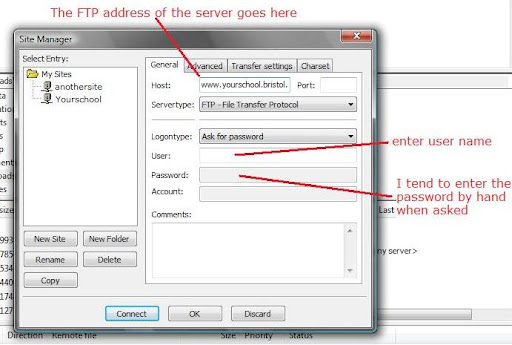 Press the new site button
- Enter the FTP details for the site that you have been given
- and connect to the server
- your password when prompted
- and wait for the software to connect.
- the panes to the left are files and folders on your PC (the local site)
- the panes to the right files and folders in the FTP server (the remote site)
To prepare the space and to help organise my future podcast files I
- right clicked in the remote site window
- Selected create directory
- right clicked again and named this new directory podcasts
- Double click the podcast directory
- repeat the create directory process
- Name this folder for your year group/class or station name,
So in this post I have
- Set up FileZilla Portable to access my file storage space from any computer,
- Created my two folders (directories) on the FTP server
Before I do that though I need to set up the podcast page, and establish the feed that will allow our listeners to subscribe to it. I will talk about how I have approached this in the next posts in my Podcast Station Challenge series.
Previous posts
13.8.08
My Class Podcast Station Challenge:Starting Point
 This weekend I decided to take up the challenge of setting up a customisable class Podcast station for my students.
Over the past year we have been using Podomatic, a fantastic free host that has proven really useful, alongside my preferred classroom Podcast Authoring tool, podium, in helping me understand how the technical side of process works (ish!).
As a learner however I have decided it is time to try something new, to move beyond the adoption phase and take a few risks, as I move into the adapt and innovate phase of using this technology. So in this series of posts I want to share the first steps I am taking in "mashing" together some free online tools, with some not so free or readily available ones to set up this new and customisable podcast space .
Podomatic As a Starting Point
Podomatic is an online Podcast "publishing" solution. It offers for the absolute beginner three key ingredients required to set up and run a podcast station, and all in one place. They offer two solutions
- Basic (a free service)
- and Pro (their fee paying service).
Both solutions provide
- Easy upload and storage space for your audio or video files
- A home page to host and display details around your podcast and it's episodes
- An RSS feed to allow regular listeners or viewers to subscribe to, be updated about and download your show to a podcatcher (eg iTunes) without the need to continually visit your podcast site.
- Log in to your account,
- navigate to your My Podcast Space
- Upload your audio or video file
- Create a post and show notes
- Attach the audio file from your uploaded media or PC to this page
- and press the publish button.
Publishing the file to your would be audience is however the final step in the process, and even though sites such as this offer online recording tools, if you want to be a bit professional and add music or refine and edit recordings before publishing you will need local tools on your computer to help prepare and edit your audio files before publication. As I have mentioned in a number of posts and above Podium by Softease is my prefered classroom tool for this, though a number of other tools such as the open source platform Audacity, and Garageband on the Mac have been written about by other colleagues as tools they use to enable this.
Moving On The Context For The challenge
I originally set up a Basic Podomatic Account. This provides 500mb of online storage space for your audio and video files but also a bandwidth limitation for downloads. This has been more than sufficient for the work we have done this year, but I want the students to begin using video and audio podcasts more regularly as part of their classroom work this session, and enable them to help customise the page that hosts links to their content and feed, this either meant finding or developing a local solution or looking at a subscription serviece or combining tools available to support this and so the crux of this personal challenge, and the subject of the upcoming series of posts.
Using the solution I have decided upon, I have already set up the space, and as a taster it can be found here. Over the next couple of posts I want to share with you the tools I have used to do this, and the process involved. Hopefully you will revisit and follow my quest.
7.8.08
"Robot Voices" And Reading For Expression
Voice Synthesisers and text readers are much more lifelike these days, but still lack a certain something. Something I admit to finding difficult to listen to and often "cringeworthy", is that a word? Today in my feeds however I spotted a space, that set me up for a brief playtime, and thinking about how I might reconsider their place in my classroom.
We have used word processors with text reader plugins for a long time, and my colleagues and I have been regularly entertained by the mispronunciations, the effects that misplaced punctuation has on the way the text is read, and extended periods of phoneme play as we have tried to get the reader to say what we meant. My all time favourite has to be the metallic "youglee," read by an MS Word plug we had once, that no matter how hard we tried we could not get the synthesiser to pronounce as "Ugly."
 The space that inspired this post today was "Read the Words," posted by colleague Angela Maiers. "Read the Words" hosts and converts text from a range of sources to audio. The files it produces can then be linked to, embedded in blogs or websites, used to podcast with or be downloaded as MP3 files to use locally for playback. They also offer advice about how to have files read more realistically, by spelling phonetically or including punctuation to effect cadance and expression, even slowing down the pace of the reader. Text can also be uploaded in Spanish and French, though not being a linguist, I don't feel able to comment on this. The space also offers a choice of avatars to read the files for you, and it was playing with these this morning that has lead to this post today.
While playing, I discovered choosing two different avatars to read the same text, gave not only two different voices to listen to, but also two completely different renderings of the text. Here are two examples of a section of the fairy tale "Little Red Riding Hood," read by "Michael" and "Lauren" The text was copied and pasted from an online PDF file, at Logo.com.
Lauren |Example
Michael Example
Example read by Your Truly
Listening to these clips got me thinking about how I could use this tool in tandem with student podcasting to help help evaluate and think about our use of expression when reading, and the importance of enunciation when we perform texts reading or speaking aloud.
As well as embedding these files in web pages, they could be prepared and downloaded for use within Powerpoint shows or IWB notebooks as shared texts. Comparison files could be recorded by the students, other colleagues or the class teacher, using tools such as Podium or Audacity, to support discussion around the effects on the audience of different aproaches to reading the text. Perhaps sharing a prepared text in this way, with groups of students could form the starting point for a challenge during guided sessions. Can they listen to and improve the presentation together? This could result in them recording their performance for sharing with the class and comparison with what they originally heard. Using voice synthesized files, prepared pre session might be an interesting starting point and way in to supporting critical review of performance, and using the files alongside or embedded in enlarged texts on the IWB, a means for promoting discussion around the role of punctuation, while mispronunciations could be a vehicle for thinking about how words sound in context and modelling the strategies we might use to ensure sense from the text we are engaged with. I would be really interested in any thoughts you might have around this post, and look forward to hearing from you.
Screen Shot Captured from Read the Words via Kwout
We have used word processors with text reader plugins for a long time, and my colleagues and I have been regularly entertained by the mispronunciations, the effects that misplaced punctuation has on the way the text is read, and extended periods of phoneme play as we have tried to get the reader to say what we meant. My all time favourite has to be the metallic "youglee," read by an MS Word plug we had once, that no matter how hard we tried we could not get the synthesiser to pronounce as "Ugly."
 The space that inspired this post today was "Read the Words," posted by colleague Angela Maiers. "Read the Words" hosts and converts text from a range of sources to audio. The files it produces can then be linked to, embedded in blogs or websites, used to podcast with or be downloaded as MP3 files to use locally for playback. They also offer advice about how to have files read more realistically, by spelling phonetically or including punctuation to effect cadance and expression, even slowing down the pace of the reader. Text can also be uploaded in Spanish and French, though not being a linguist, I don't feel able to comment on this. The space also offers a choice of avatars to read the files for you, and it was playing with these this morning that has lead to this post today.
While playing, I discovered choosing two different avatars to read the same text, gave not only two different voices to listen to, but also two completely different renderings of the text. Here are two examples of a section of the fairy tale "Little Red Riding Hood," read by "Michael" and "Lauren" The text was copied and pasted from an online PDF file, at Logo.com.
Lauren |Example
Michael Example
Example read by Your Truly
Listening to these clips got me thinking about how I could use this tool in tandem with student podcasting to help help evaluate and think about our use of expression when reading, and the importance of enunciation when we perform texts reading or speaking aloud.
As well as embedding these files in web pages, they could be prepared and downloaded for use within Powerpoint shows or IWB notebooks as shared texts. Comparison files could be recorded by the students, other colleagues or the class teacher, using tools such as Podium or Audacity, to support discussion around the effects on the audience of different aproaches to reading the text. Perhaps sharing a prepared text in this way, with groups of students could form the starting point for a challenge during guided sessions. Can they listen to and improve the presentation together? This could result in them recording their performance for sharing with the class and comparison with what they originally heard. Using voice synthesized files, prepared pre session might be an interesting starting point and way in to supporting critical review of performance, and using the files alongside or embedded in enlarged texts on the IWB, a means for promoting discussion around the role of punctuation, while mispronunciations could be a vehicle for thinking about how words sound in context and modelling the strategies we might use to ensure sense from the text we are engaged with. I would be really interested in any thoughts you might have around this post, and look forward to hearing from you.
Screen Shot Captured from Read the Words via Kwout
9.7.08
Podcasting in the Classroom
Wanted to flag up the new home of colleague James Watson's Podcast Station, "Podcasting in the Classroom."
In James' words the space is
"A podcast about the benefits of using podcasting as a transparent tool for learning and teaching in school classrooms."
Featuring interviews with teachers sharing their use of Podcasting and Recorded audio to support classroom learning, the site promises to be a fantastic resource.
In James' words the space is
"A podcast about the benefits of using podcasting as a transparent tool for learning and teaching in school classrooms."
Featuring interviews with teachers sharing their use of Podcasting and Recorded audio to support classroom learning, the site promises to be a fantastic resource.
23.6.08
How Has Podcasting Helped Me With My Learning?
 Last summer at about this time I published a post, " So what do you think the children get from Podcasting?" Since then I have extended my adventures, using Podium as a tool to support talking for writing and having posted my thoughts for the past 6 months, I thought I should share my students ideas about how the tool has supported their learning. I am currently writing student reports. Part of our reporting process is a series of Teacher/Learner Conferences, where we share and set targets and review our progress. The children are asked about things they feel they have made improvements in, things they still need to develop, and finally the things that they think have helped them to move on with their learning. Last week I began my end of year reviews, and several students mentioned how the podcasting process had helped them. I will not expand on this any more for the time but hand you over to the voice of my class. Here are some quotations lifted directly from conversations with students in my class.
- Podcasting and talking for writing have helped me to, think about if my sentences and the things I am writing make sense, so I can go back and change them
- Podcasting has helped me because I could listen to myself and then go back and correct the things I have written.
- I like podcasting because it is fun, and it has helped me to think about full stops and capital letters in my reading and writing.
- I really want to work on my reading, I want to make better sense of things, and read with expression, because I really like podcasting... We do lots of talking for writing before we write things and this also helps me get my ideas sorted before we work.
- I like it when we get the chance to go over stuff again, so I can see where I went wrong. I have really liked podcasting too because it has helped me think about my punctuation, and what kind to use.
14.6.08
Storyphones: Language for Learning
 With the increased availability of cheaper MP3 players, I have pondered buying a few to use with portable speakers. The main problem is that this would further add to the cacophony that already exists in my talk driven classroom, or require children to take turns with headphones. I could not really see a way of enabling multiple access to the device without a portable speaker or docking option. Then today this was published on Ictopus, about a new device the Storyphone. What a cool idea, essentially a wireless mp3 based listening centre.
I love the effect that podcasting and audio recording has had on my student's perception of reading and its purpose, and have wondered for a while about how we could use this to our advantage, in having students prepare stories for others around school. Either performing from existing texts or preparing their own for sharing through the network. The recording part would be fairly straightforward but individual or group access as said above to the completed texts more of a challenge, requiring either computers to be tied up or access to individual mp3 players. I realy like the idea of the storyphone on soooooooo many levels! Or something similar, and would encourage the company to ask the question "Why stop with selling this idea as a foundation stage tool?" I would love to have something similar available to use more widely with students of all ages across my school, how about you?
22.4.08
So What is Podcasting?
I was really pleased to find this in my feeds today, a video from the fine folk at CommonCraft that explains podcasting as only they can... Ladies and Gentleman this is Podcasting in Plain English
21.4.08
Podcasting about Podcasting
Last week, I was interviewed by James Watson of Softease, about my experiences using their school podcasting solution Podium in the classroom. James has used this interview in his own Podium created podcast called Podcasting in the classroom launched today through the Podium Blog
The first episode features James himself introducing the series and its aims, and eloquently explaining what Podcasting is (and is not) while outlining some of the benefits the process may offer for engaging learners in the classroom. The second episode features an interview with the voice behind this blog, recorded last week, sharing his experiences of using Podium in the classroom while exploring and expanding on some of the ideas, I have written about here. I hope you find this useful, but also that you take the opportunity to subscribe to what promises to be an interesting series of programmes. I am certainly looking forward to downloading and listening to future episodes and sharing in how others are using podcasting as a tool to engage students and inspire learning in their classroom. Thanks James:o)
The first episode features James himself introducing the series and its aims, and eloquently explaining what Podcasting is (and is not) while outlining some of the benefits the process may offer for engaging learners in the classroom. The second episode features an interview with the voice behind this blog, recorded last week, sharing his experiences of using Podium in the classroom while exploring and expanding on some of the ideas, I have written about here. I hope you find this useful, but also that you take the opportunity to subscribe to what promises to be an interesting series of programmes. I am certainly looking forward to downloading and listening to future episodes and sharing in how others are using podcasting as a tool to engage students and inspire learning in their classroom. Thanks James:o)
22.3.08
The Bayeux Tapestry
Yet another You Tube Video, but this time courtesy of Joe Dale's Blog.Here he has pointed readers to this amazing Animated version of the Bayeux Tapestry by David Newton, and additonal online resources from The Museum of reading.
13.3.08
Layering it on Thickly! Playing With Podium Multitracking
 This week I downloaded, installed and had a little time to play with the Podium Upgrade and am loving it. The key difference between version 1 of Softease's Educational Podcast Tool and the upgrade is that it affords multitracking, and the ability to layer sound within the episodes being produced.
It would be an understatement to say little other than this has changed, though the simplicity of the tool has not altered. The principles and processes underpinning podcast development with the tool remain the same but the ability to add additional tracks to files being developed, adds an entirely different dimension to the possibilities for multimodal outcome creation. The addition of multitracking now enables a less linear approach to developing episodes than before, and is something I know at least one of my students has been waiting for. By adding a new track; background music or sound effects can be imported and added, and individual volume controls on each track used to alter their volume, enabling simple mixing and allowing the user to add depth to the "soundscape" they are recording.
The idea of "soundscape" development is a really exciting additional aspect of the upgrade for me, I can see possibilities for using this new version of Podium not only for podcasting but as a wider part of our digital authoring toolbox. Perhaps performing a role as a basic editing suite alongside Garageband, to create narration and backing for MovieMaker or PhotoStory projects. The addition of Multitracking makes Podium much more versatile, somewhere to create and produce sound tracks or "soundscapes"for use in other digital outcomes as well as its intended purpose, for example the narration for a video with background music. The object based nature of the soundtrack, means that not only can new sounds be imported, but they can also be dragged to the location desired by the user on a timeline, making them audio authors. Where perhaps previously the notion of, we added that sound because we could or because it was the only one we could find, this enables us to build on student experiences of Podcasting or evaluation of video texts to support consideration of the role sounds and music play in multimodal texts we engage with or are creating. I am really excited by the possibilities that this new version of Podium brings to the idea of "Playing With Sound," So now its time to have the upgrade installed and begin exploring the practicalities of my wandering mind!
29.2.08
Playing With Words: Podcasts, Performing Poetry and Plenaries
I took quite a while formulating a suitably illiterative title for this post, that sets out to share two new podcast episodes. I didn't intend to publish these when I planned the writing unit from which they come, indeed the writing outcome for our work was actually to publish a written anthology, which even as I write is awaiting lamination and binding.
Both podcast episodes were actually recorded in class as integral and incidental parts of our talking for writing process while we experimented and explored rhyme and rhythm during the writing of Limericks and Spells. The poems created by the students were recorded and then played back during literacy hour plenary sessions, inorder to support evaluation of written outcomes against the success criteria we had established for each poetic form. Recording and Listening to the voice recordings was a part of the students ongoing and assessment for learning process, a chance to externalise and share their internal voice, and to consider how or whether their poetry worked within the rules we had established together, as well as an opportunity to consider with their friends how they might improve not only their content but also to gain suggestions about things they might do to restructure parts of the poem before publication. There is for me anyway an incredible sense of satisfaction in these recordings in terms of seeing (sorry hearing) how far the students have moved in their emerging understanding of the relationship between reading and writing for an audience and speaking and listening as a presentational device. They were so keen to include expression and what they were learning that in one case particularly the evidence presented in the limerick shows how the student had so obviously used the spoken cadence and rhythm rehearsed not only during rehearse and write process, but also in his final presentation of his final poem. It is also obvious from the background sound that each poem was recorded in class. The internal mike on my current laptop being sensitive enough to capture not only the performers voice but also the rustlings and tappings of the more "kinaesthetic" members of my class. Fortunatley within the spell recitals these have added to the stormy atmosphere added through the inclusion of thunder claps. I hope you enjoy listening to these, but that also this post in support, offers another perspective on the potential role of digital voice recording and podcasting software in the classroom.
Both podcast episodes were actually recorded in class as integral and incidental parts of our talking for writing process while we experimented and explored rhyme and rhythm during the writing of Limericks and Spells. The poems created by the students were recorded and then played back during literacy hour plenary sessions, inorder to support evaluation of written outcomes against the success criteria we had established for each poetic form. Recording and Listening to the voice recordings was a part of the students ongoing and assessment for learning process, a chance to externalise and share their internal voice, and to consider how or whether their poetry worked within the rules we had established together, as well as an opportunity to consider with their friends how they might improve not only their content but also to gain suggestions about things they might do to restructure parts of the poem before publication. There is for me anyway an incredible sense of satisfaction in these recordings in terms of seeing (sorry hearing) how far the students have moved in their emerging understanding of the relationship between reading and writing for an audience and speaking and listening as a presentational device. They were so keen to include expression and what they were learning that in one case particularly the evidence presented in the limerick shows how the student had so obviously used the spoken cadence and rhythm rehearsed not only during rehearse and write process, but also in his final presentation of his final poem. It is also obvious from the background sound that each poem was recorded in class. The internal mike on my current laptop being sensitive enough to capture not only the performers voice but also the rustlings and tappings of the more "kinaesthetic" members of my class. Fortunatley within the spell recitals these have added to the stormy atmosphere added through the inclusion of thunder claps. I hope you enjoy listening to these, but that also this post in support, offers another perspective on the potential role of digital voice recording and podcasting software in the classroom.
26.2.08
Social Networking: Celebrating the Joy of Learning
After recent TV programmes and negative press surrounding Web 2.0 environments, it was a treat to meet, download and watch this Teachers TV presentation 30 mins well spent, and potentially a great INSET tool to boot! School Matters - Online Social Networks - Friend or Foe?
19.1.08
BETT 2008: Podium 2
 In addition to Honeycomb, I was also interested in getting a sneak peak at the upcoming podium upgrade. Podium is already one of my suggested primary school toolbox essentials, but I am sure one of my current students J will be excited by what I saw today.
 He has been asking for a while now how he can get background music into the podcasts we have been making. Up until now the solution would have been to use a tool such as Audacity. But in a couple of weeks or so we should be able to upgrade our familiar tool Podium and enable play with multi track recording, and so the addition of texture to the files he wants to produce. To enable this the interface has had an add track button added to the sound recorder. Each new track has an independent volume control enabling adjustments of sound levels to be made on each new track. Using the import tool, sound files can be added to these, as before, but where in the previous versions sound files acted rather like punctuation in a sentence, breaking up a linear soundtrack, these will allow for the addition of texture, by laying sounds over or under existng recordings. This is a really exciting development again for multimodal text development. From the initial demo, the tool again seems to look back to the object based roots of Softease Tools, with sound clips on new tracks dragable fo placement in new locations on a timeline, enabling sound effects or music to be added to coincide with particular points in the soundtrack. Can't wait to get our upgrade, and to see what the students can achieve next in writing with sound. Perhaps it really is time to have a go at creating a radio show.
18.12.07
I'll Be The Narrator, And You Can Be Baby Bear...
 Just a snippet from a learning conversation, but an exciting moment to end the term with. Three weeks ago we began our visit to playscripts and the presentation of speech. This culminated in the publishing of our class podcast performance of "On The Way Home" based on the story by Jill Murphy. Yesterday afternoon I had a request from one of my students, for he and some friends to borrow my laptop. This was a curious though not unusual request, as I often use it with students an additional classroom machine or in support of small group tasks, but obviously I wanted to know why only my laptop would do, when we have two other other PCs in the classroom they could use. It transpired that he and a group of friends, had decided they would like to make a podcast themselves, and my laptop having a nice internal mike, which they had used as a class would fit the bill beautifully for the task they had
  decided upon. They had found the book "Baby Bear's Christmas Kiss," by John Prater, in the school library, and bringing it back to class to share, had decided it would make for a good performance. Among the group, J had decided that he should be the narrator, (actually as it turns out he had also assigned himself the role of director) his friends being the voices of the characters, to who he had already allocated parts. Unaware of this initially but liking the idea I sent the children off to rehearse the story they wanted to tell.
The process they engaged with was really fascinating, taking the role of narrator in the story, J had decided to tell all the unspoken parts, referring to the punctuation in the text, to help delegate speaking parts, while he and his friends used speech verbs, and picture cues to help discuss how they would read the text. They spent a considerable amount of time discussing this and rehearsing so this morning we set up Podium to enable them to record their efforts.
 Each pair of pages was allocated as a chapter, in order to enable the children to edit each piece of the story in short chunks, or to delete sections and rerecord until they were happy with it. This part of the process is something which previously they had only done supported so I was interested to see what would happen. They were very keen to get the story to sound the way they wanted it, deleting chunks and sometimes whole tracks before rerecording it, replaying after every recording session, and using the wave forms they quickly identified overly long periods of silence, pauses or gaps in the soundtrack. After being shown how they began to delete these spaces independently. In order to complete the recording they finally asked if they could stay in at playtime. On completing the file, I helped them to copy and paste the clips in each chapter together, and we added the enclosing music file. The completed story went down a storm with their class mates, and tomorrow they have been asked to share their story with children in other classes. We also published the file to our podcast station, which added that extra wow to the outcome. We hope you enjoy sharing it too. Baby Bear's Christmas Kiss can be found by following this link to the Buzz. Merry Christmas from Year 3.
7.12.07
On The Way Home: Podcast Published
This evening I have published our latest class podcast episode, "On The Way Home." The episode is the outcome of a writing unit I reflected on in my post "Talking For Writing", dated 22/11/07, and can be found on both my learning to podcast space, and our class podcast station. I am incredibly proud of the outcome, the students worked really hard to achieve the performance. Well done Y3. I hope you enjoy.
Subscribe to:
Posts (Atom)